
Convert MKV with DTS to MKV with AC3 Audio while also having the posibility of getting batch conversion with this simple conversion tool.. #DTS to AC3 #MKV to AC3 #AAC to AC3 #DTS2AC3 #MKV #AC3

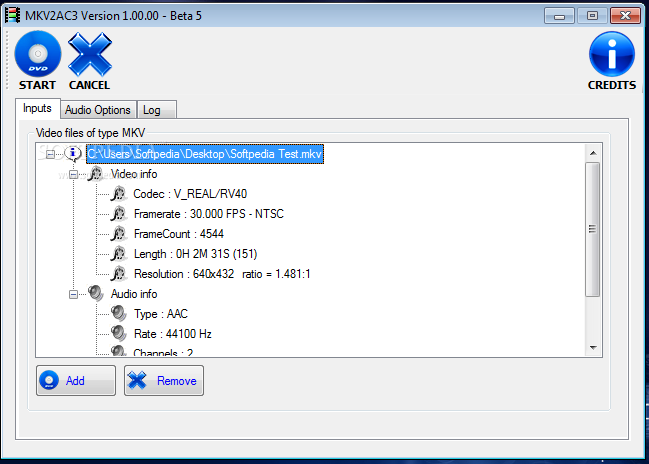
MKV2AC3 is a lightweight and multi-language application designed to help you easily convert MKV files into AC3 audio.
The converter is easy to use, as it offers you a tab-based interface that makes it suitable for both advanced and beginner users. First, you have to add the MKV files you want to convert. The program supports batch conversion, thus allowing you to process more than one file at once.
The video files you select are placed in a list, enabling you to view the detailed video and audio information for each one of them. For example, you can find out each files' codec type, framerate, length and resolution, as well as the audio type, bitrate and delay.
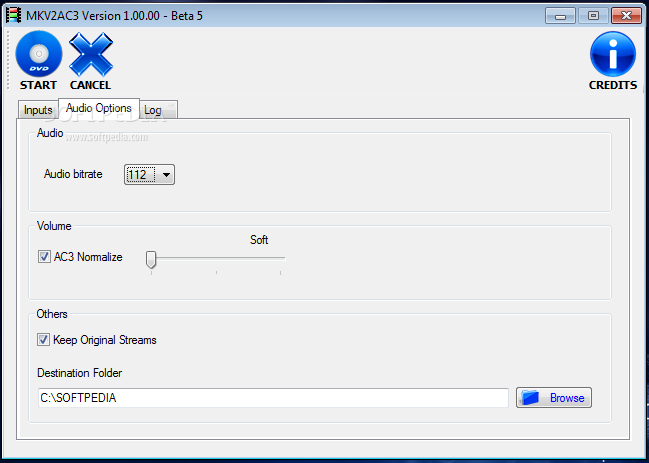
Before starting the conversion process, the application requires you to set some general options, such as the destination directory or the CPU type. Also, you are able to optionally choose to keep the original stream and temporaries.
Moreover, you can easily choose other options for the output file. Some of them are the audio bitrate and the volume.
The program offers you two conversion methods: 'aften' and 'eac3to'. In case you choose the second one, you have to set the path to the EAC3TO executable file.
After doing all this, you simply have to press the 'Start' button and the application does the rest in no time. The program includes a 'Log' tab, where you have the possibility to monitor the conversion process for each file.
MKV2AC3 is a simple and fast utility that allows you to obtain MKV files with AC3 audio. Nevertheless, it only accepts MKV source files and it only supports the AC3 output format. Thus, if you need a more complete audio conversion tool, you have to look for something else.
What's new in MKV2AC3 1.03.04:
- (FIX) Conversion from string "number / number" to type 'Integer' is not valid.
- (FIX) EAC3TO Downmix failed with some sources
- (FIX) AFTEN method failed to convert from DTS 2.0
MKV2AC3 1.03.04
add to watchlist add to download basket send us an update REPORT- runs on:
- Windows All
- file size:
- 38.7 MB
- filename:
- mkv2ac3_1_03_04_32bits_64bits.zip
- main category:
- Multimedia
- developer:
- visit homepage
IrfanView

calibre

Bitdefender Antivirus Free

Microsoft Teams

Windows Sandbox Launcher

Zoom Client

paint.net

ShareX

7-Zip

4k Video Downloader

- ShareX
- 7-Zip
- 4k Video Downloader
- IrfanView
- calibre
- Bitdefender Antivirus Free
- Microsoft Teams
- Windows Sandbox Launcher
- Zoom Client
- paint.net