
A video converter that can help you play your favorite clips on portable devices, such as iPhones and other iOS handsets, AppleTVs, Blu-ray players, or gaming consoles. #Video Converter #Convert Video #Video Encoder #Converter #Encoder #Blu-ray

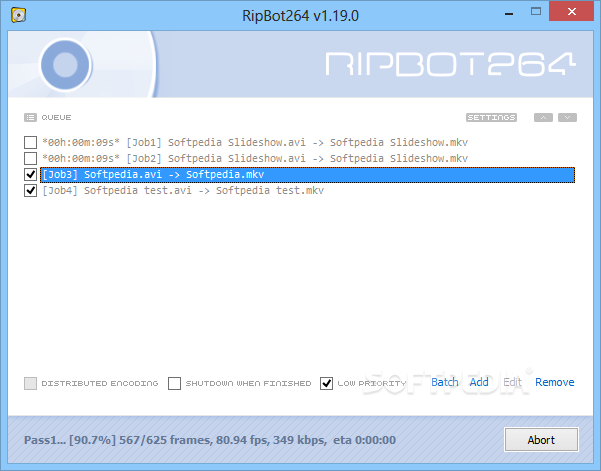
RipBot264 is a software solution designed to help users convert video files from one format to another, providing a very clean interface to guide them through the whole process.
The application has been designed to make files work on the most popular devices on the market, including iPods, iPhones, AppleTVs, PSPs, XBOX 360 gaming consoles and Blu-Ray players.
In other words, it supports the most popular video formats on the market, while providing a set of extra tools to help you in this task.
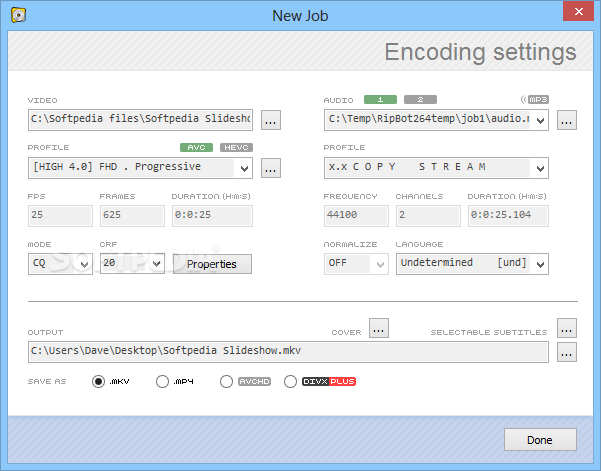
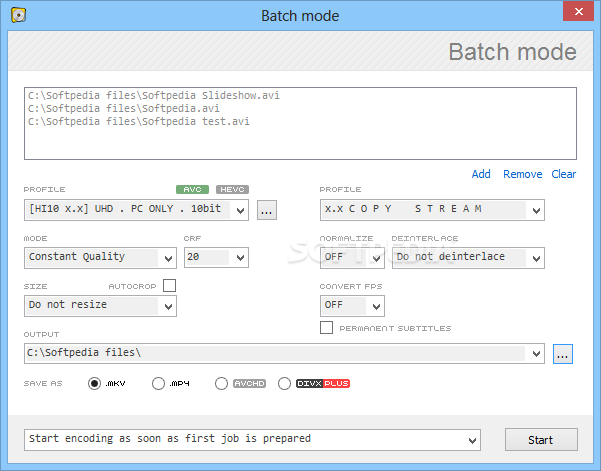
Setting up a new job is very easy because efforts are reduced to inputting the paths to the audio and video content, playing a little bit with the settings (be it FPS, frames, duration, frequency, channels and duration), picking the output folder and hitting the “Done” button.
The “Picture Properties” screen offers you access to a number of more advanced features that enable you to crop the image, change de-interlace settings or change resolution.
RipBot264 is far from being a user friendly application and it's not at all addressed to beginners, so novice users may have a hard time getting along with it. There is no help manual, so searching the web is the only viable solution to get more info on its tools.
Plus, there are some components that you may need to download, including audio and video decoders, as they are not included in the standard package.
It all went very smooth during our test and that's not surprising at all, with the app running on very low computer resources.
RipBot264 remains a handy tool for experienced users, but more user-friendly features aimed at beginners would be greatly welcomed.
What's new in RipBot264 1.26.0:
- Added: Work Hours (automatic encoding within selected hours)
- Added: Automatic track name extraction
- Added: VP9 decoding
- Changed: Script won't be re-analyzed if there was no change
RipBot264 1.26.0
add to watchlist add to download basket send us an update REPORT- runs on:
-
Windows 10 32/64 bit
Windows 8 32/64 bit
Windows 7 32/64 bit - file size:
- 162 MB
- filename:
- RipBot264v1.26.0.7z
- main category:
- Multimedia
- developer:
- visit homepage
Bitdefender Antivirus Free

4k Video Downloader

ShareX

Zoom Client

7-Zip

IrfanView

Windows Sandbox Launcher

Microsoft Teams

paint.net

calibre

- Microsoft Teams
- paint.net
- calibre
- Bitdefender Antivirus Free
- 4k Video Downloader
- ShareX
- Zoom Client
- 7-Zip
- IrfanView
- Windows Sandbox Launcher