
A user-friendly program that helps you convert video files (e.g. AVI, DV, MPEG, MOV) to FLV file format while allowing you to tweak the clip size, framerate and audio settings. #FLV Encoder #Flash movie #Video conversion #Flv #Video #Encoder

Video conversion is nowadays a rather common task that many of us do in order to make a large movie filmed in high resolution suitable for uploading it on an online service, for example.
Among the variety of dedicated encoders and converters out there, there is one specialized in generating Flash videos, namely Rival FLV Encoder.
Clean feature lineup and supported file formats
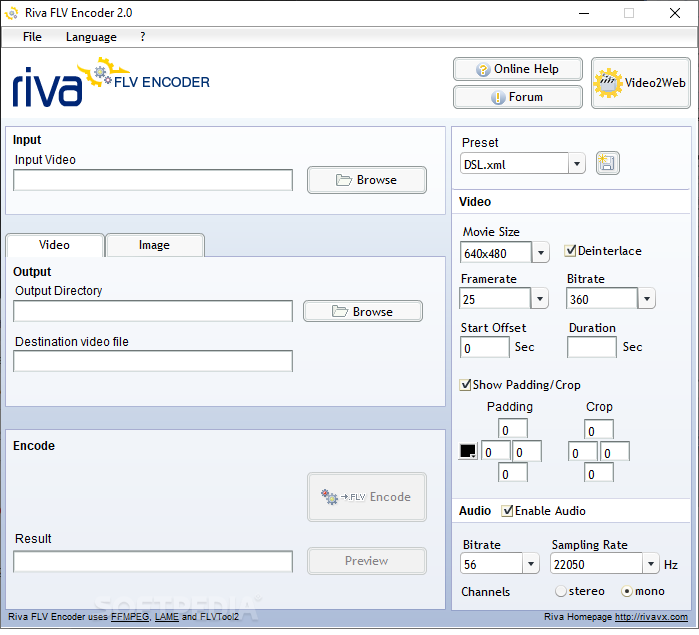
The first run will bring you a very clean and pleasant interface, which means it should be easy to use too.
All functions are nicely grouped into the main window for instant access and it will work with the most common formats, including AVI, DV, MPEG, MOV, and WMV.
Picking a file to work with, as well as the destination video file can be done from the left side of the main window, while the right one has been reserved exclusively for tweaking settings, such as video size, frame rate and audio settings.
A neat feature is the cropping ability that enables you to effortlessly edit the video so some parts of it will not be shown after the conversion is complete.
After a few tests, Riva FLV Encoder proved quite impressing as the whole conversion and encoding are done fast and without using a lot of system resources. The application did get unresponsive at times, but only when working with large, high-quality files.
All things considered, it's safe to say that any type of user will find Riva FLV Encoder very easy to use and because it works fast and offers a decent set of features, this software can be included in anyone's utility belt.
Riva FLV Encoder 2.0
add to watchlist add to download basket send us an update REPORT- PRICE: Free
- runs on:
-
Windows 10 32/64 bit
Windows 8 32/64 bit
Windows 7 32/64 bit
Windows Vista 32/64 bit - file size:
- 4.7 MB
- filename:
- RivaEncoderSetup.exe
- main category:
- Multimedia
- developer:
Zoom Client

4k Video Downloader

IrfanView

7-Zip

Microsoft Teams

Windows Sandbox Launcher

ShareX

Context Menu Manager

Bitdefender Antivirus Free

calibre

- Context Menu Manager
- Bitdefender Antivirus Free
- calibre
- Zoom Client
- 4k Video Downloader
- IrfanView
- 7-Zip
- Microsoft Teams
- Windows Sandbox Launcher
- ShareX
