
SDP Downloader is a program that can download media files from a website that are protected by mms protocols. #Mms protocol #Media download #Streaming download #Streaming #Mms #Media

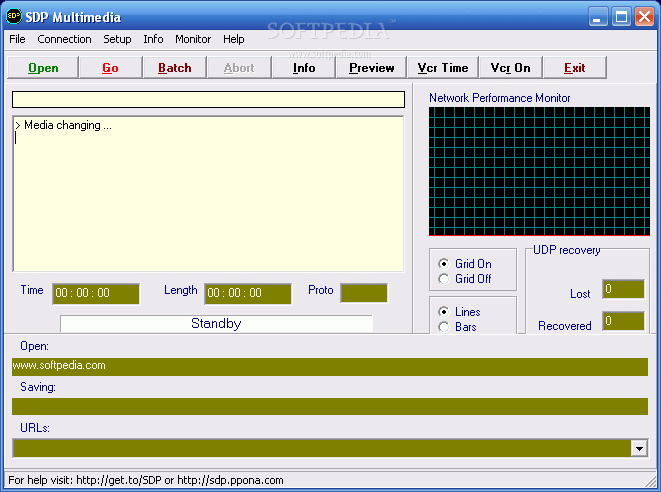
SDP Downloader (Streaming Download Project) is a very handy utility that enables you to download media files streamed via the MMS protocol.
The application is very easy to use, although at first glance you may think otherwise. There are multiple buttons in the main window, but all of them are there to provide information on the content being downloaded.
The whole procedure is pretty basic. Open an MMS link and press the “Go' button to start downloading. SDP Downloader also supports batch downloading, so you can work with multiple streams at the same time.
The application supports proxy servers, while the settings menu comprises a bunch of tools regarding the offset start, but also the protocols the program is able to handle. You can thus download content not only from MMS protocols but also from HTTP, TCP, and UDP.
Unfortunately, the multimedia files you save on your computer are exported in ASF format, which means you should be able to play them with Windows Media Player. There's no other format support, so in case you wish to keep them as MP3, you have to download a separate conversion tool.
An upside of the application is that it comprises a detailed help file, so SDP Downloader is able to assist you all the time.
Of course, it remains very light on computer resources all the time, but keep in mind that it also depends on the Internet connection, so in case the download is interrupted, chances are that it's your connection's fault.
SDP Downloader is quite a handy tool, not only because it works so great, but also thanks to the fact that it's user-friendly.
What's new in SDP Downloader 2.3.0:
- Defaults page added to setup dialog
- Defaults action fixed, now all parameters are reset
- SDP media test site link added to Help tab
SDP Downloader 2.3.0
add to watchlist add to download basket send us an update REPORT- runs on:
-
Windows ME
Windows 9X
Windows 2003
Windows XP
Windows 2K - file size:
- 1.3 MB
- filename:
- SDP_v2_3_0.msi

- main category:
- Multimedia
- developer:
- visit homepage
Context Menu Manager

7-Zip

Microsoft Teams

Bitdefender Antivirus Free

ShareX

Zoom Client

4k Video Downloader

Windows Sandbox Launcher

IrfanView

calibre

- Windows Sandbox Launcher
- IrfanView
- calibre
- Context Menu Manager
- 7-Zip
- Microsoft Teams
- Bitdefender Antivirus Free
- ShareX
- Zoom Client
- 4k Video Downloader