iLove description
A handy software that will enable you to watch your favorite videos right on your mobile device.
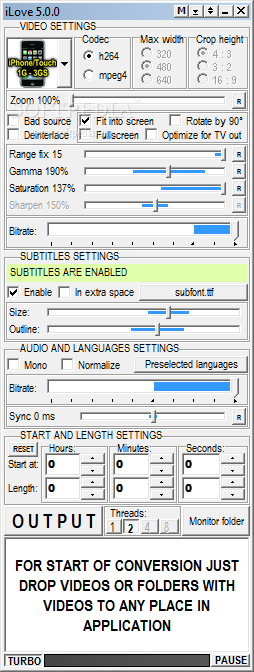
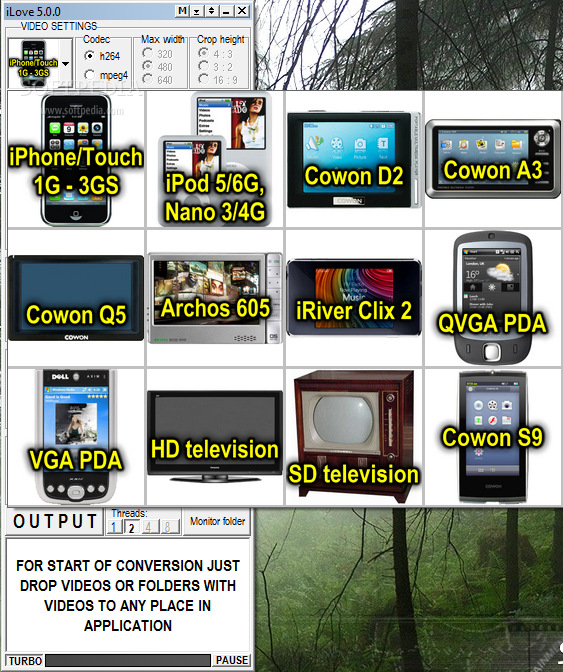
iLove is application for conversion of video (including subtitles) to mobile devices like iPhone, iPod 5G/6G/Touch/Nano, Cowon D2, A3, Q5 or Archos 605. So all you need to do is add your videos, choose your device and start converting.
Here are some key features of "iLove":
· Videos (including DVDs) and subtitles are inserted by drag and drop, you can also use CTRL + V
· Whole folders with videos can be inserted, application will filter videos and subtitles from it automatically; if you want to rip a dvd just insert dvd drive icon or folder when the dvd is located, or any file which is in that folder(.vob, .ifo, .bup)
· Subtitles are searched automatically if they are named same as video
· Support for more video tracks and subtitles which are directly in video (usually .ogm, .mkv, .avi or DVD uses this)
· You can insert subtitles directly to application with or before video, or by dropping it directly at the video in list of momentaly converted videos (the line in this list will then change color from red to green)
· SUPPORT NO RECOMPRESSION OF AUDIO, if the source is mpeg-1 layer 3, useful for videos from YOUTUBE.COM without recompression of audio - it is inteligent, automaticaly switch from "no recompression" to "compression" if soucre audio isn't mpeg-1 layer 3
· Using ffmpeg for muxing, and -async 192000 command (there is no A/V sync problems for Cowon D2)
· It can monitor a folder on your computer and everytime when new video is inserted into this folder then it will automaticaly start conversion
of this video (if this video is locked(for example by other application), then will wait until this video is unlocked and then start conversion)); if subtitles with the same name as a video are located in the same folder, then is used automaticaly; you can set that source videos will be automaticaly will be deleted after conversion
· - support zoom video to fullscreen (you can set if you will see black borders on your portable player or not), also support zoom which can be set in % (you can set how much will be black borders removed)
· Based on mencoder, ffmpeg, mp4box and FLVextract, NO A/V SYNCHRONIZATION PROBLEMS, WITH QUALITY SET TO MAX, it using Lanczos 10 tapes luma 10 tapes chroma filter for resizing, using quantitizer instead of video bitrate, for mp3 you setting quality instead of bitrate - this means that you will have videos always in the same quality
· It will inform you about success (or not succes) in finding of subtitles by a special nice transfluescent window that show in the midle of the screen (the great thing is that for example when you browsing internet with your browser and this window appear, then when you click on that window then the browser will not lose focus - only thing that happen is that the info window dissapear), or after conversion finish then it will show you how many subtitles wasn't found in the middle of application, and if you stop the mouse over it then it will also show for which videos weren't found subtitles
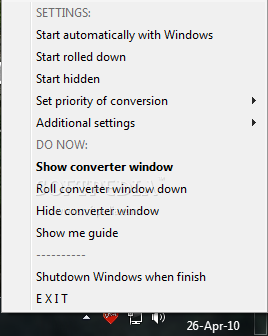
· Can be started hidden or rolled down (this is good if you want to use it as a WIDGET)
· Automatic deinterlace if the source is MPEG2 (it using Donald Graft Kernel Deiterlacer), because there is 95 % probabilty that it is from interlaced DVB or Camera (nothing happens when source isn't interlaced, because it deinterlaces only interlaced parts of movie (it is inteligent))
· If you try to shutdown Windows while converting then application will stop this shutting down and ask you if you realy want to shutdown Windows
· Start of encoding and lenght of final video CAN BE SET BY MOUSE WHEEL (at least for me it is extremely timesaving), and every slider in can be also set by mouse wheel
· If you pause the starting of new convesions and you forget it, then aplication in five minutes will (if there is no mouse activity over application) disable this pause and start conversion (this is good for always absent-minded people); the window with avaiable audio/subtitles tracks or titles will also dissapear in 60 seconds automaticaly
· Subtitles are autosizing - for example in resolution 640x480 they take 2/3 of width and in resolution 320x240 they take also 2/3 of width
· Everything what you set in application is SAVED (this takes me a LOT of work)
· Help is integrated directly in application, just stay with mouse for example on button, checkbox, etc. - the help window will appear (disappear time is set to 100 seconds)
· Conversion running at idle priority (it will not slow down your computer, you can do anything while converting)
· Support multicore PCs (1-4 cores)
· It have TURBO button, if clicked then conversion is about 5x faster (at the cost of quality)