
Simple and lightweight application that allows you to fix and repair damaged or corrupted DivX, AVI, ASF, WMV, WMA, RM, and RMVB files. #Video fixer #Remove index #Repair video files #Video #Fixer #Index

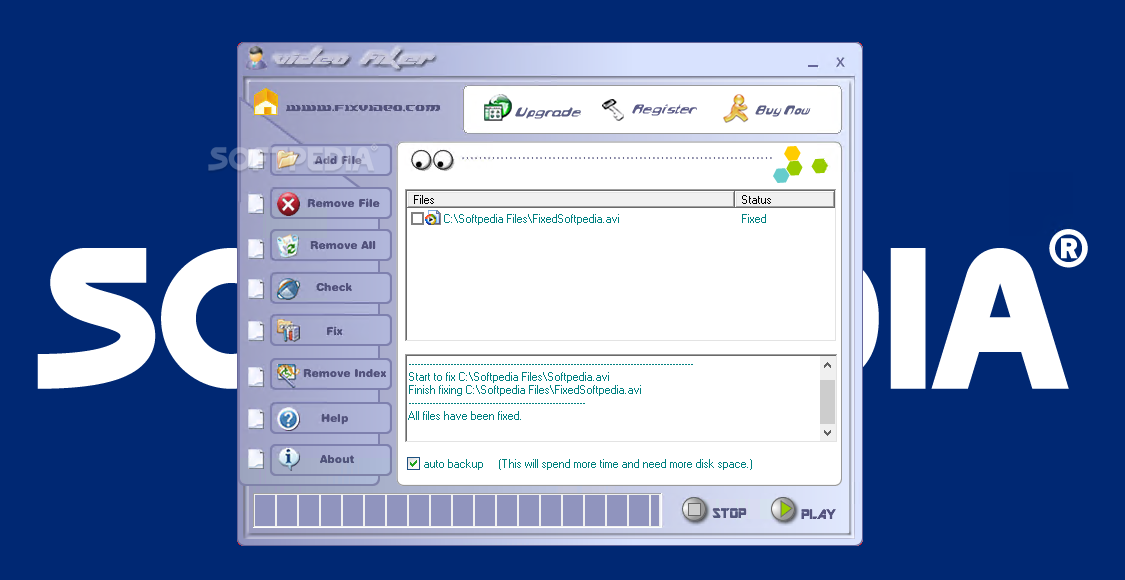
Video Fixer is a very easy-to-use Windows tool that can fix damaged and corrupt video files, even if the files in question are not completely downloaded.
There's nothing too complicated about this application, seeing as users can repair the video file in just a few clicks.
Video Fixer supports the most popular video files out there, including AVI, ASF, WMV, WMA, RM, RA, RAM and DivX, with the repair process taking just a few minutes, depending on the file size.
The interface makes the whole job very easy, as it provides nifty buttons to add damaged files to the list and start the actual repair process.
Besides fixing the damaged or corrupted files, Video Fixer can also check and remove indexes of the video files you choose, but that's a feature only available in the full version.
Although there's no settings menu to help you configure the app, developers have also included a detailed help file, thus offering you the possibility to obtain usage instructions from within the app.
If we were to vote for an improvement, we would go for drag and drop support to quickly add new files to the list and for a built-in media player. At this moment, Video Fixer opens all files with Windows Media Player.
Video Fixer might come in handy to many users out there, although it can be easily considered a very expensive product. It's still free to try, so you can give it a quick try right now.
What's new in Video Fixer 3.23:
- Rename the software to Video Fixer
- New interface,operate more easily
- New function 'check before fixing' and 'remove index of the movie'
- Add auto backup option
Video Fixer 3.23
add to watchlist add to download basket send us an update REPORT- runs on:
- Windows All
- file size:
- 1.3 MB
- filename:
- videofixer.exe
- main category:
- Multimedia
- developer:
4k Video Downloader

Context Menu Manager

Microsoft Teams

7-Zip

Windows Sandbox Launcher

ShareX

IrfanView

calibre

Bitdefender Antivirus Free

Zoom Client

- calibre
- Bitdefender Antivirus Free
- Zoom Client
- 4k Video Downloader
- Context Menu Manager
- Microsoft Teams
- 7-Zip
- Windows Sandbox Launcher
- ShareX
- IrfanView