
A vintage-looking multimedia player that can cover basic video and audio processes while requiring almost no space and resources. #Movie player #Free movie player #Video player #Video #Player #Movie


ViPlayer is a tool developed to play movies and other video files on your system. It also supports some audio extensions.
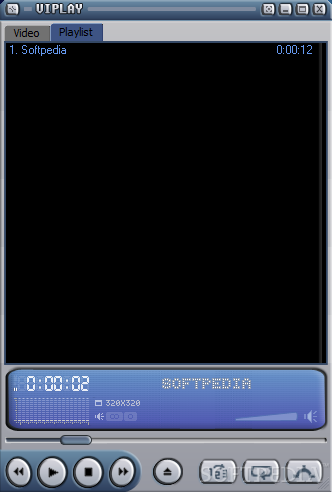
The installation process takes only a few seconds, and the program has a very simple interface, which is welcomed. It probably reminds you of Winamp, but the buttons are very small.
In order to add files, you can only use the tool's file browser, because drag and drop do not work (on Windows 7, at least). Luckily, ViPlayer supports most popular video formats, including AVI, ASF, MKV, XVID, MPEG, and WMA.
What can you do in this software? Set file associations, take snapshots, assign hotkeys and mouse actions, customize subtitles, and change audio settings (use DeDynamic DirectShow filter, adjust dynamic amplification and pre-amplification, set audio output device).
ViPlayer supports multiple profiles and several languages. You can toggle between time mode and frames mode, jump to a particular time, view movie details, switch to full screen or desktop mode, change aspect ratio, use digital zoom, adjust color controls (brightness, contrast, hue, saturation, sharpness, gamma), change resolution, add bookmarks, create and save playlists, and more.
The program uses a normal amount of CPU and system memory. However, the image sometimes turns to black when you switch to another process and then return to ViPlayer, although the sound works perfectly normal. Also, you cannot exit the program by pressing Alt+F4, but CTRL+X.
In conclusion, ViPlayer is a great tool for playing video files, but it could use some work when it comes to the interface.
ViPlayer 2.09
 Softpedia Editor's Pick
add to watchlist
add to download basket
send us an update
REPORT
Softpedia Editor's Pick
add to watchlist
add to download basket
send us an update
REPORT
- runs on:
- Windows All
- file size:
- 720 KB
- filename:
- ViPlay209.exe
- main category:
- Multimedia
- developer:
- visit homepage
ShareX

Windows Sandbox Launcher

Microsoft Teams

calibre

4k Video Downloader

7-Zip

paint.net

Zoom Client

IrfanView

Bitdefender Antivirus Free

- Zoom Client
- IrfanView
- Bitdefender Antivirus Free
- ShareX
- Windows Sandbox Launcher
- Microsoft Teams
- calibre
- 4k Video Downloader
- 7-Zip
- paint.net