
Play your favorite tunes in WAV, MP3, OGG, FLAC, AU,MP2 and other file formats using this simple and straightforward software solution. #Media player #Audio player #Video player #Play #Player #Cross-platform

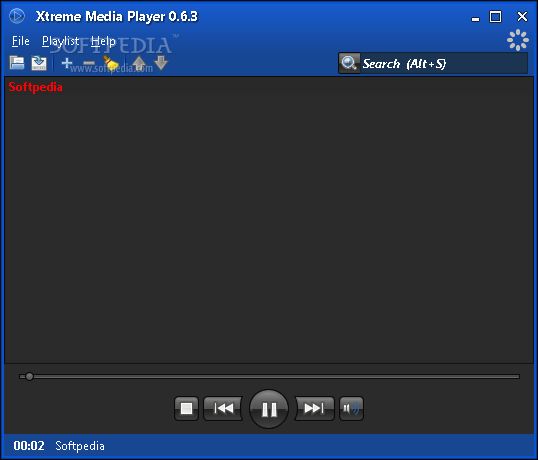
Xtreme Media Player is a program designed to help you play audio tracks in a user-friendly environment. It supports several file types, including WAV, MP3, OGG, FLAC, AU and MP2.
The interface of the application is clean and pretty intuitive. Audio tracks can be imported from the hard drive by using either the file browser or the 'drag and drop' method. But you can also open music from URL.
The file list displays the track number, title, duration, artist, album and genre of each item. You can use some basic audio player functions, such as pause and stop, create a playlist, go to the next or previous track, adjust the volume and navigate back and forth within the song.
Additional features of Xtreme Media Player include a search function; you can enable repeat or shuffle mode, randomize items in the playlist, save the playlist and switch to visualization mode.
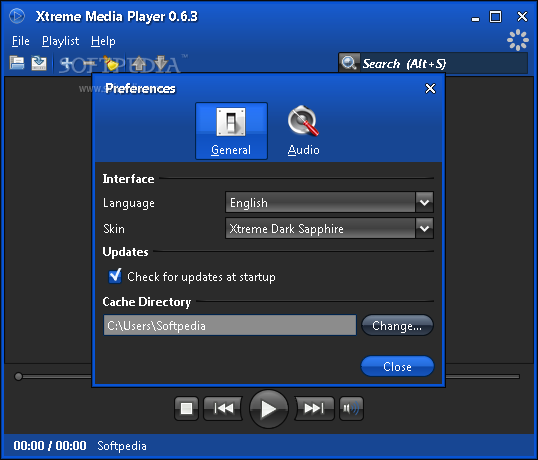
From the 'Preferences' screen you can change the interface skin and language, disable UI effects, make Xtreme Media Player automatically check for program updates at startup, change the default cache directory and select the audio playback device.
The audio player needs a moderate amount of CPU and system memory, supports keyboard shortcuts and has a good response time. We haven't come across any issues in our tests; Xtreme Media Player did not freeze, crash or display error popups. Thanks to its intuitive layout, Xtreme Media Player can be seamlessly handled, even by less experienced users.
What's new in Xtreme Media Player 0.8.0:
- player:
- support for different audio formats: aac audio (aac, m4a) mpeg audio (mp1, mp2, mp3), ogg vorbis, flac, speex, wav, aiff (aifc, aif), au (snd).
- support for playlist formats like xspf, m3u and pls.
- remote music playback via url.
Xtreme Media Player 0.8.0
add to watchlist add to download basket send us an update REPORT- runs on:
- Windows All
- file size:
- 6.3 MB
- main category:
- Multimedia
- developer:
- visit homepage
IrfanView

Bitdefender Antivirus Free

Windows Sandbox Launcher

7-Zip

Zoom Client

calibre

paint.net

Microsoft Teams

ShareX

4k Video Downloader

- Microsoft Teams
- ShareX
- 4k Video Downloader
- IrfanView
- Bitdefender Antivirus Free
- Windows Sandbox Launcher
- 7-Zip
- Zoom Client
- calibre
- paint.net