Search Perform an advanced search query SOFTPEDIA
 
SOFTPEDIA
Updated one minute ago
HomeSubmit a program for being reviewedAdvertise on our websiteGet help on surfing our websitesSend us your feedbackGet information about our XML/RSS backend and how to use itBrowse the news archiveVisit our discussion forumVizitati forumul in limba romana


Program Finder NormalFreeware onlyShareware only

BTWincap 5.3.8 Report spyware 

Click to download BTWincapBTWincap - Softpedia Pick Award (If you developed this product, click here to download your award)
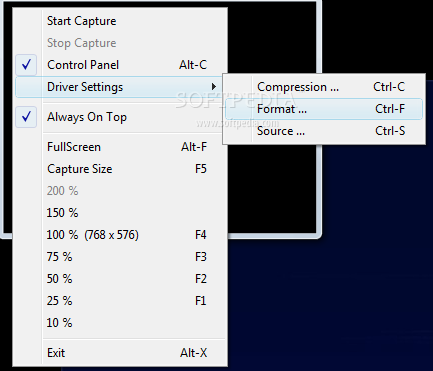
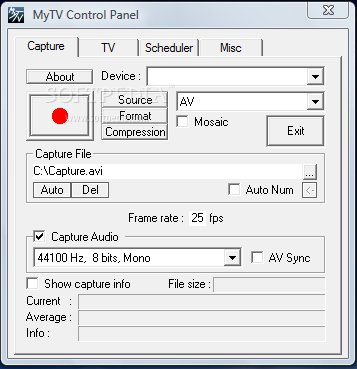
View more BTWincap screenshots (1)
 Downloads: 74,118
Rating: Very Good (4.1/5) | Rated by: 255 user(s)
Add to download basket     Send us update information
 Developer: Eduardo José Tagl | More programs by this producer
 License: Freeware  
 Size / OS: 315 KB, Windows All
 Last Updated: March 24th, 2004, 19:04 GMT
 Category: C: \ Multimedia \ Video \ Video Recording
 Read user reviews (0) Add a review Refer to friend Subscribe
    Download BTWincap

BTWincap description
BTWincap - WDM Video Capture Driver for Bt848, Bt849, Bt878, Bt879

You can capture at full framerate in full screen. Just use Preview mode
instead of overlay mode. Overlay mode probably won't work under
VideoForWindows (VFW) applications (Bug in VFW to WDM wrapper provided by Microsoft)

You can capture individual fields (this requires an application that uses
the DirectShow API to capture video). Don't know an app. that let you
capture individual fields using DirectShow API already exists. Of course, there are many applications that allow you to capture full frames and video using DirectShow.

You can capture at any framerate you like : The driver internally subsamples to achieve this "thanks" to a bug of the Microsoft's WDM layer. This is specially important for Video For Windows API based capture applications (As Adobe Premiere)

There is plenty of capture video formats (all supported by DirectShow and the hardware). For example, use YV12 for MPEG capture!)

You can use all the newer/(faster) DirectShow capture applications (I would recommend Ulead Media Studio Pro, or Ulead Visual Studio, as those can use this driver to capture full frame size/full rate mpeg2 video.

All the video capture programs (except NetMeeting , read below) will let you use the TV tuner as your source, and change channels if you like.

AM/FM radio is supported, Just set TV tuner mode to RADIO!

You can use this driver under Win2000 (untested ... I think it needs to be recompiled, maybe not).

Driver is optimized for speed, so CPU requirements are less than the
original driver (VXD).

You can select different colorspaces/sizes independently for preview and capture (On well written DirectShow applications only). Even, if you capture at full frame sizes, but at a lower framerate than the maximum allowed, and with the same colorspace and size for preview and capture, you will get preview using all the frames not captured.

Driver stores your settings, so they will remain as you have left them the last time you used the driver (depends on the program being used, some programs overwrite those settings.)

All the videostandards the chipset supports are supported.
Don't be suprised if you get a lot more than you were used to with your old driver. Even PAL_N_Combination (Used in Argentina) is supported. (Requiresa Bt848A or better)

Using "BTWincap", you can:

· get closed captioning and Teletext
· turn on Gamma correction to achieve a better image in your monitor (only RGB modes)
· do a (sort of) white balance control.
· control hue, contrast, brightness, saturation.
· control Sharpness of the image (very useful to get rid of video
· noise that is against video compression quality.
· select the region of the screen to capture. (DirectShow offers this API, so programs using it can set it, if this was taken into account)
· use NetMeeting to do video conference. There is one thing about this: You must select Video Source before launching NetMeeting from another video Capture program.


Installation:

Before running the installer, you must have installed the old drivers of
your card,or have listed the Video Capture card in Device Manager under Other Devices.. (A yellow question mark). You must also have your capture card installed inside your computer.


Start the installer. The first screen offers to Install the driver or to
Uninstall ANY already installed driver associated with the Brooktree capturecard. The last option should ONLY be used to uninstall THIS driver to reinstall ANOTHER DIFFERENT one, if you want to reinstall the original driver that came with your board. You MUST NOT uninstall any driver to install this one.


Select Install option, then press the "Next" button. The licence agreement will be displayed. You must agree with that terms to continue. Agree to the license and press "Next".

Now, the Main installation screen will be displayed, and , depending on your settings, the driver will be properly configured for your card. You should know that improper configuration settings will make the driver partially functional. Probably TV tuner and TV audio won´t work as expected (if they work at all).

The driver will try to autodetect the card model. If it displays a card name at the botton of the dialog, above the "Next" button, you can use the card "Autodetected" model setting. If it says you must pick a card model, you must do so. This is caused probably because your video capture card does not provide a reliable way to identify it(all the older Bt848 based cards have this problem, but nearly all new Bt878 based cards should be autodetected).

You must also pick the Tuner model. This is important, because the wrong tuner type will probably make TV channel tuning impossible. You must be aware that on FlyVideo, AverMedia, Miro, Pinnacle , Voodoo and Hauppauge models, tuner model is autodetected, so, with those cards, you could let the driver autodetect it. For all the other capture cards you need to specify the correct tuner.

If you don´t know the correct tuner model, you can try to read the tuner model from the capture card itself (the aluminium box). If you can´t do that, you will have to use a trial and error method. I suggest that , in this case, you select a Phillips model based on the videonorm of your country. Remember that for Pal N Combination (Used in Argentina), you should select a NTSC tuner.

There are 3 checkboxes to check; the first one askes if there is a TDA9855 on board. You should leave it unchecked unless you have sound problems and you see/know that your card has one of those chips onboard. The second one asks if your card has a FM tuner. Normally, you must check this if you were told your card was able to tune FM radio. Note that Miro, Pinnacle and HX card owners MUST NOT check this. The driver knows about those special cards that need special parameters to work (because they can tune Radio, but using
another specific tuner for that function).

The third checkbox, asks if you want to try to tune FM radio with the TV
Tuner. This is possible for all cards that can´t normally tune FM Radio, but will give bad quality FM Mono. (Better to have it than not to have it).

That´s all, now press the "Next" button: The installation screen shows.
Press "Install" button, and everything should be installed! - Good luck!


Softpedia guarantees that BTWincap 5.3.8 is 100% FREE, which means it is a freeware product (both for personal and commercial use) that does not contain any form of malware, including but not limited to: spyware, viruses, trojans and backdoors.

This software product was tested thoroughly and was found absolutely clean, therefore it can be installed with no concern by any computer user.

However, it should be noted that this product will be retested periodically and the award may be withdrawn, so you should check back on this page from time to time. (click here for more information)


Related downloads IT News Popular downloads New additions   Latest reviews  
SnagIt 8.2.3
Screen capture program that allows you to capture an exact copy of anything that appears on your Windows screen
SplitCam 4.2
A virtual video capture driver allows for connecting several applications to a single video capture source
AT Screen Thief 3.9.11
Screen capture with build-in screenshot editor
FullShot 9.5.1.1
A professional screen capture application designed for any user who needs an effortless, effective way to work
SimplyCapture 1.3
SimplyCapture is a powerful screen capture tool!
Screen Capture Master 2.9.6
It's time to be captured by the Screen Capture Master!
AviAcreen 1.3
AviScreen is an application for capturing screen activity in the form of AVI video or bitmap images
My Screen Capture 1.20
My Screen Capture lets you capture screen in 5 ways, get instant screen in memory
ZapSnap 1.0
ZapSnap is the only screen capture utility you'll ever need

go to top Use the following code to link to this page:


Welcome!
Hello, Guest

Login if you have a Softpedia.com account.

Otherwise, register for one.

Main categories:
  • Antivirus
  • Compression tools
  • CD/DVD Tools
  • Office tools
  • Programming
  • Authoring tools
  • File managers
  • Desktop Enhancements
  • Internet
  • Network Tools
  • IPOD TOOLS
  • Mobile Phone Tools
  • Multimedia
  • Tweak
  • System
  • Security
  • Others
  • Science / CAD
  • UNIX
  • Windows Widgets
  • PORTABLE SOFTWARE

  • Week's best:
  • Adobe Flash Player 1...
  • Intel Chipset Softwa...
  • Uxtheme Multi-patche...
  • SRS Audio Sandbox 1....
  • SP3 UxTheme Patcher ...
  • PECompact 2.82
  • Sony Vegas Movie Stu...
  • 3DMark Vantage 1.0
  • Total Commander 7.03
  • VistaMizer 2.5.1.0
  • AVG Free Edition 8.0...
  • Windows XP Service P...
  • Ashampoo Burning Stu...
  • XviD Media Codec 1.1...
  • Blu-ray Disc Ripper ...
  • Blu-ray Region Code ...
  • Adobe Photoshop Ligh...
  • PowerDVD 8.0.1531
  • EF Commander 6.54
  • Microsoft Windows In...
  • Nero 8 Lite 8.3.2.1
  • WebSite-Watcher 4.41...
  • EVEREST Ultimate Edi...
  • Nokia PC Suite 6.86....
  • VMware Workstation 6...
  • AnyDVD HD 6.4.2.2
  • Messenger Plus! Live...
  • The Bat! Voyager 4.0...
  • Windows Vista Servic...
  • Nero 8 8.3.2.1
  • © 2001 - 2008 Softpedia. All rights reserved.
    Softpedia™ and Softpedia™ logo are registered trademarks of SoftNews NET SRL.
    Copyright Information | Privacy Policy | Terms of Use | Contact Softpedia | Update your software | Archive