
Track your bandwidth usage with this intuitive application that runs in the tray and features a handy information window with current and past data. #Monitor bandwidth #Bandwidth monitor #Internet traffic monitor #Monitor #Bandwidth #Internet traffic

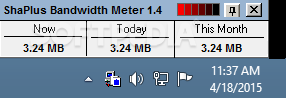
ShaPlus Bandwidth Meter is an application that helps you monitor Internet traffic and view statistics for a user-defined period of time.
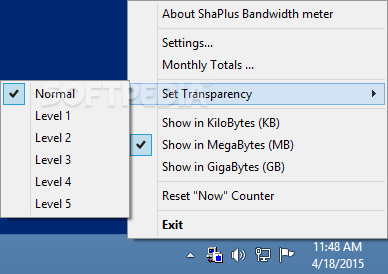
The program displays a small popup screen with current traffic statistics, today's and this month's figures, but more information is accessible via the icon placed in the Windows System Tray.
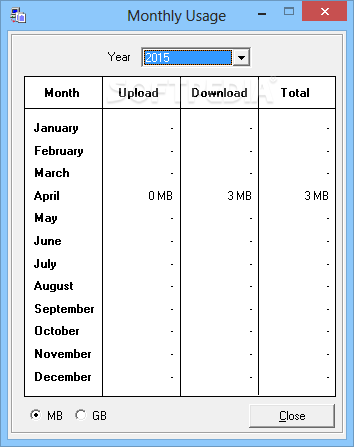
You can for example see the monthly totals, with separate details for each month of the year, but also customize the aforementioned popup screen and see the traffic information in kilobytes or megabytes.
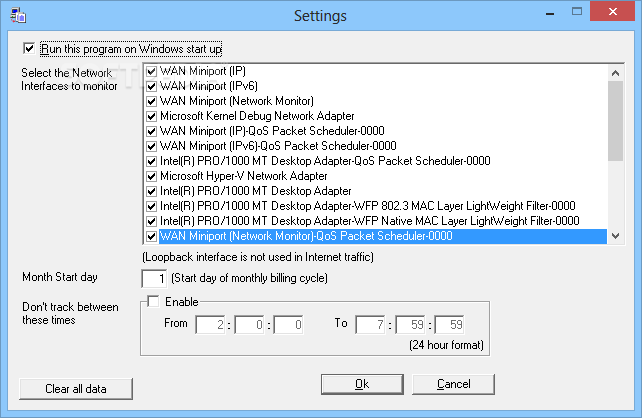
It's recommended to have a look in the settings menu as well because it lets you configure the network interfaces to monitor, a very useful option especially if there are multiple network adapters installed on your computer.
Plus, you're allowed to configure the month start day and an interval to disable traffic monitoring, especially useful to those who have unlimited data plans during the night.
Of course, since ShaPlus Bandwidth Meter is such an easy to use application, it doesn't hamper system performance at all, remaining fairly light on hardware resources all the time.
It works just fine on all Windows versions on the market, but administrator privileges are required on Windows 7 in order to monitor specific network adapters.
Overall, it's pretty clear that ShaPlus Bandwidth Meter can come in handy to many users out there and thanks to its intuitive interface it can be installed by both beginners and those with a bit more computer knowledge. There is no help file, but it's almost impossible to get lost in its features.
What's new in ShaPlus Bandwidth Meter 1.4.2:
- Fixed bug not showing year 2016 in 'Monthly Totals'
ShaPlus Bandwidth Meter 1.4.2
add to watchlist add to download basket send us an update REPORT- PRICE: Free
- runs on:
- Windows All
- file size:
- 117 KB
- filename:
- ShaPlus Bandwidth Meter-Setup.exe
- main category:
- Network Tools
- developer:
- visit homepage
Windows Sandbox Launcher

7-Zip

IrfanView

Zoom Client

Context Menu Manager

Microsoft Teams

calibre

4k Video Downloader

Bitdefender Antivirus Free

ShareX

- 4k Video Downloader
- Bitdefender Antivirus Free
- ShareX
- Windows Sandbox Launcher
- 7-Zip
- IrfanView
- Zoom Client
- Context Menu Manager
- Microsoft Teams
- calibre