
Redial Busy Dial Up Network Connections. #Dial Up Connection #Redial Connection #Connect Dial Up #RAS #Redial #Dial Up
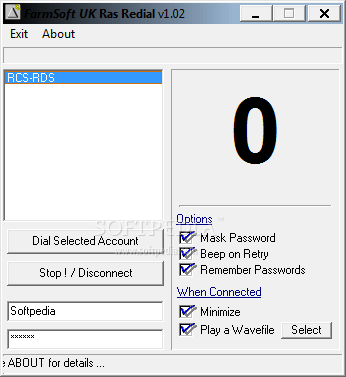
The RAS Redialler application was developed to be a small tool that will retry Dial Up Networking (DUN) connections and is particulary useful when using high usage DUN Connections.
As more and More ISP's use Freephone or Toll Free Numbers it is a chore to have to manually redial the ISP over and over waiting for the "Line Busy" response and then redialling, hoping that you will get a connection.
Usage: The available DUN Connections will be shown, select the one you wish to connect to, type in your user and password optionally check the Save Passwords and click "Dial Selected Account" - if you select Save Passwords, these are saved when you first dial the selected connection.
(The Account / Password details are held in the fsRedial.ini file)
The program will now dial the connection.
If it receives a Busy or No Answer it will hang up and redial again, incrementing the counter so you can see how many tries it has made.
If an error is returned for Incorrect Password, Username etc, then the program will stop dialling and display a message so you can correct the Username or Password as required.
On Connection you can select a Wave File to be Played, you can also get the program to emit a beep every time it cycles.
You can elect to have the program minimize to the System Tray on connect, right clicking on the System Tray Icon will allow the program to be Restored or you can disconnect a connection or exit completely.
The Password can be masked if required.
The options you select, together with the selected wave file for connection indication is saved when you exit the program.
System requirements
- Dial Up Network Connection
What's new in RAS Redial 1.02:
- Cosmetic Changes - 3D Checkboxes etc.
- New Option to Remember Password and Account Settings
- Checks for Presence of RAS on Program Start
RAS Redial 1.02
add to watchlist add to download basket send us an update REPORT- runs on:
- Windows All
- file size:
- 318 KB
- filename:
- rasrdl.zip
- main category:
- Network Tools
- developer:
Zoom Client

7-Zip

ShareX

Context Menu Manager

Bitdefender Antivirus Free

calibre

Microsoft Teams

4k Video Downloader

Windows Sandbox Launcher

IrfanView

- 4k Video Downloader
- Windows Sandbox Launcher
- IrfanView
- Zoom Client
- 7-Zip
- ShareX
- Context Menu Manager
- Bitdefender Antivirus Free
- calibre
- Microsoft Teams