
Capable of forwarding multiple ports, the program parses the first data packet, and compares the data to a list of predefined rules. #Data parser #Forward port #Capture packet #Port #Receive #Packet

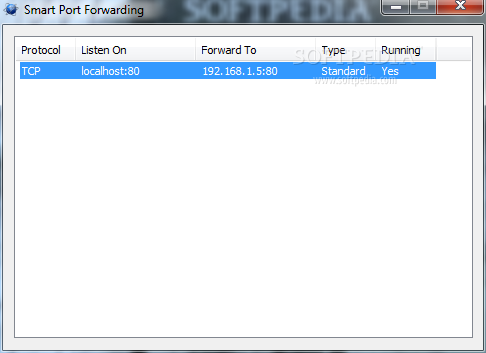
Some environments might require advanced network settings to be done in order to be able to share files or even grant access to the Internet. Smart Port Forwarding is a simple-to-use application designed for forwarding multiple ports, as the name suggests. It mainly targets advanced users, such as network administrators.
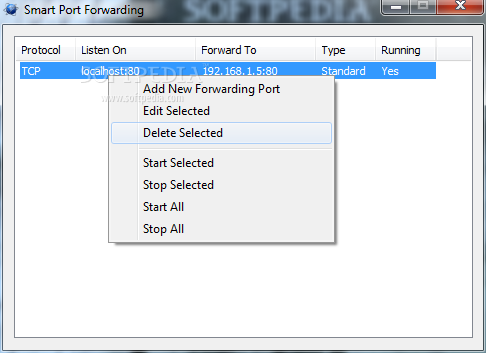
After a brief and uneventful setup procedure, you are greeted by a standard window with a plain layout, where you can add a new forwarding port through the context menu.
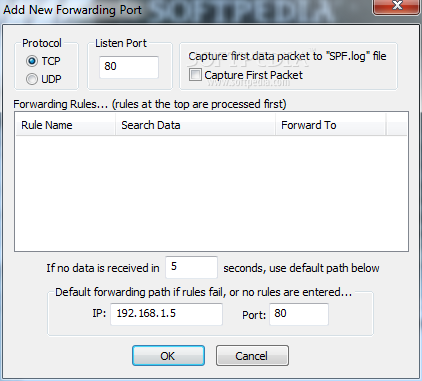
Once you specify a protocol (TCP or UDP) and listening port, you can enable Smart Port Forwarding to capture the first packet to a LOG file, and establish forwarding rules.
Note that it minimizes to the tray area on launch, but you can easily identify it through the icon and bring up the configuration panel. It's possible to make it run with Windows so it's ready when you reach the desktop.
Adding a new rule implies pointing out a rule name, search type (hex or text) and data type, along with an IP address and port number to send data to. It is possible to create as many rules as you want.
Last but not least, Smart Port Forwarding lets you establish a default forwarding path, in case all rules fail or none are entered. During an active process, the primary panel shows the protocol type, listened address and location to forward it to, type, and running status.
The program barely uses CPU and RAM, so it doesn't affect overall performance or interrupt user activity. We have not come across any issues throughout our evaluation, as the tool did not hang or crash.
Smart Port Forwarding provides a straightforward solution to forwarding multiple ports. It's most suitable for advanced users, with no integrated help file, but the simple design lets you quickly find your way around.
What's new in Smart Port Forwarding 1.0.0.1:
- Bug fix
- Added parsing timer, in case no data is sent, port will be forwarded to defaults.
- Added another UDP directional forwarding check.
- Tray Icon is now removed at the start of program shutdown.
Smart Port Forwarding 1.0.0.1
add to watchlist add to download basket send us an update REPORT- runs on:
-
Windows 7 32/64 bit
Windows Vista 32/64 bit
Windows XP
Windows 2K - file size:
- 150 KB
- filename:
- spf.zip
- main category:
- Network Tools
- developer:
- visit homepage
ShareX

Microsoft Teams

Bitdefender Antivirus Free

IrfanView

Zoom Client

Context Menu Manager

calibre

Windows Sandbox Launcher

4k Video Downloader

7-Zip

- Windows Sandbox Launcher
- 4k Video Downloader
- 7-Zip
- ShareX
- Microsoft Teams
- Bitdefender Antivirus Free
- IrfanView
- Zoom Client
- Context Menu Manager
- calibre