
This is a connectivity assistant that enables you to configure and enhance the network and Internet settings according to your needs and preferences. #Network connection #Connection management #Network administration #Administration #Network #Connection
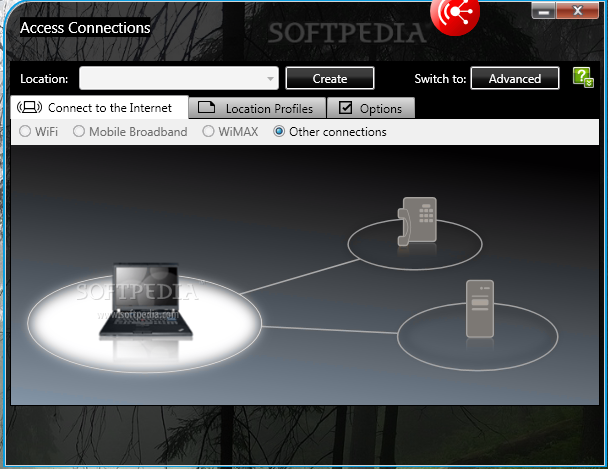
Designed for ThinkPad computer systems, Access Connections is a connectivity assistant signed by Lenovo to allow users easy modification of the network and Internet settings based on predefined profiles.
The looks are simple and to the point, with a set of three tabs for defining the type of Internet connection, accessing previously created profiles or getting into the configuration panel.
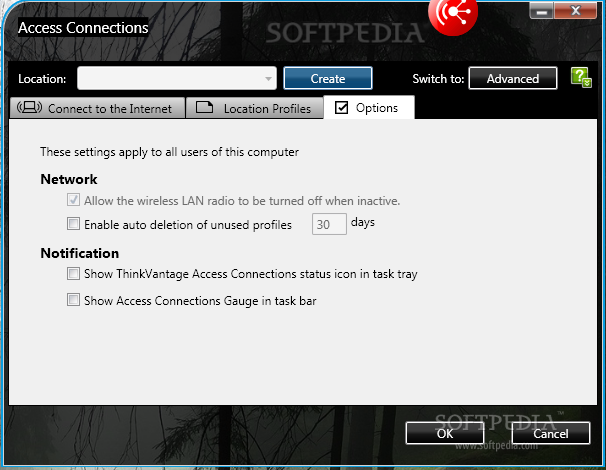
The options panel lacks the complexity users might usually associated with this kind of program. One of the choices is to disable the wireless LAN radio when it is not active and to automatically delete the profiles that have not been active for a specific period of time (the default setting is 30 days).
Also, in order to have constant information on the status of the application you can have it shown in the system tray icon.
ThinkVantage Access Connections supports LAN, wireless LAN, mobile, modem and WiMAX Internet connections.
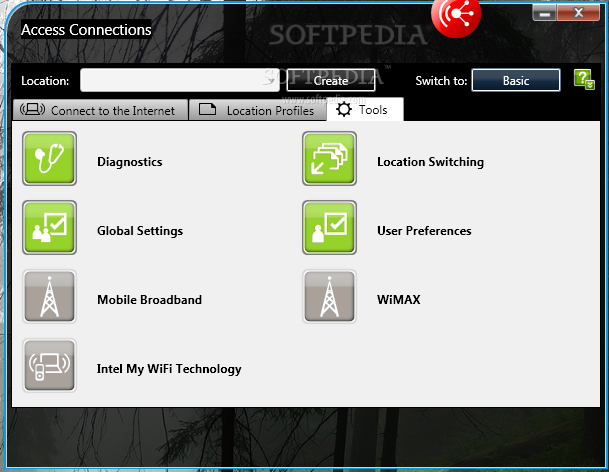
Switching to the advanced interface reveals that the program integrates a set of tools that can be used by more experienced users to detect connectivity problems.
There are diagnostic tools to check for the integrity of the packets as well as a trace route tool that allows checking the path of the connection and the delays occurring in transiting the network.
There is an IP configuration utility that allows renewing the IP or releasing it, per each adapter available.
Restoring a lost connection can be done automatically by attempting to enable the available profiles in the order provided by the user.
ThinkVantage Access Connections is flexible enough for the beginner user to work with it with no problems although it is more suitable for more experienced users, for whom it can be a real asset.
ThinkVantage Access Connections 6.26.88
add to watchlist add to download basket send us an update REPORT- PRICE: Free
- runs on:
-
Windows 10 32/64 bit
Windows 8 32/64 bit
Windows 7 32/64 bit
Windows Vista 32/64 bit
Windows XP 32/64 bit - file size:
- 43.6 MB
- filename:
- gic788ww.exe
- main category:
- Network Tools
- developer:
Windows Sandbox Launcher

Microsoft Teams

4k Video Downloader

paint.net

ShareX

Zoom Client

7-Zip

calibre

IrfanView

Bitdefender Antivirus Free

- calibre
- IrfanView
- Bitdefender Antivirus Free
- Windows Sandbox Launcher
- Microsoft Teams
- 4k Video Downloader
- paint.net
- ShareX
- Zoom Client
- 7-Zip