
Monitor your network quickly and easily with Look@LAN. A full scan of the network takes anywhere from a few seconds to a few minutes, depending on how large the network is, with Look@LAN showing the online and offline IPs. #Network monitor #Network scanner #Scan network #Monitor #Scan #Scanner

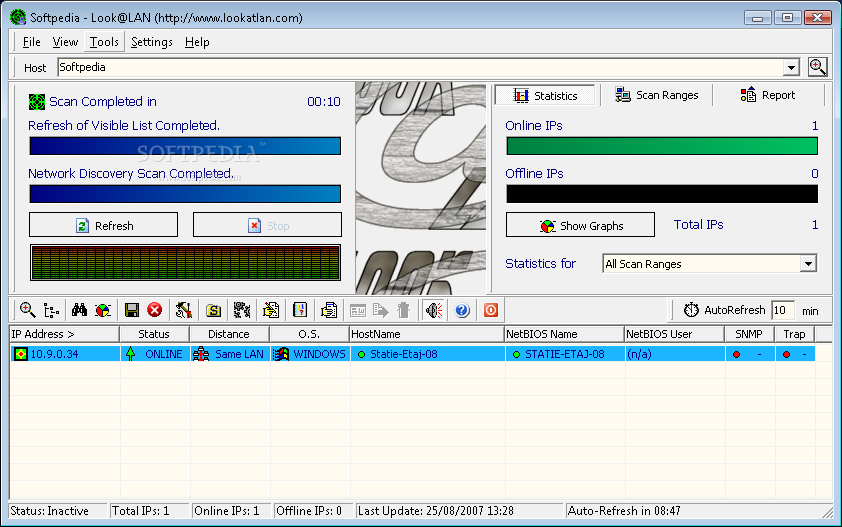
Look@LAN is a network tool that can scan the whole network and provide useful information about every single connected client, as well as detailed graphs and statistics.
The interface of the program isn't the best we've seen, so it may take a while to get used to it, but the help file is always there to lend you a hand if you got yourself in trouble.
A full scan of the network takes anywhere from a few seconds to a few minutes, depending on how large the network is, with Look@LAN showing the online and offline IPs, as well as details on every single online client.
Of course, you can define your very own scan ranges and the statistics you want to access. You can check a single host at a time, as long as you know the hostname or the IP.
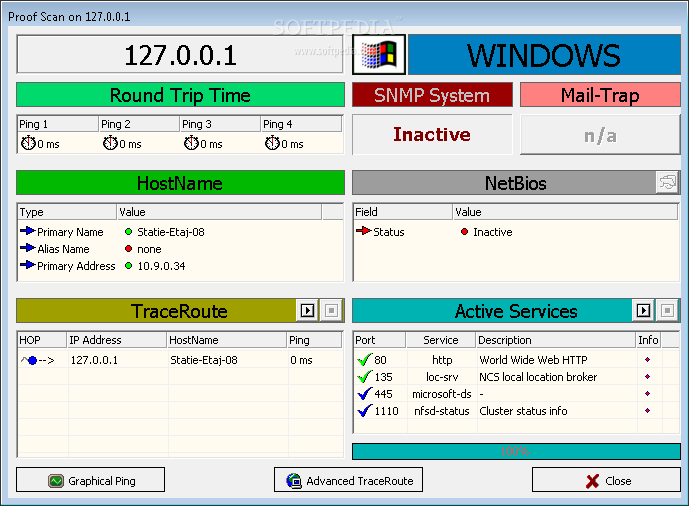
A proof scan on a single client shows round trip time, hostname, TraceRoute, NetBios information and the active services, along with ports and additional information. You can always initiate an “Advanced Traceroute” and get even more detailed stats, plus a bunch of graphs to monitor the host closely.
The “Settings” menu is divided into multiple parts, namely “Network Settings”, “SNMP Settings”, “Trapping Configuration”, “Edit PortScan Services” and “Sound Effects”.
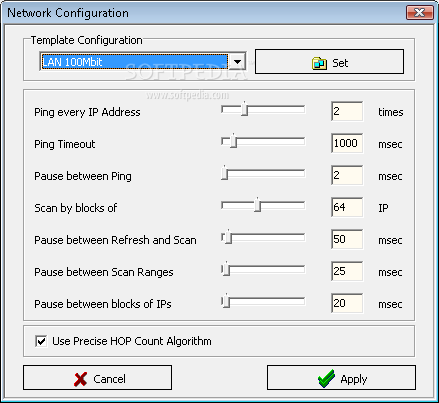
The “Network Settings” screen allows you to define the time interval to ping every IP address, the pause between pings and a bunch of other values such as refresh and scan.
Look@LAN runs on low computer resources and works on most Windows versions, but Windows 7 users need administrator privileges to scan the networks.
Look@LAN is quite a handy tool, not only to network administrators but also to regular users who want to keep an eye on a given host.
What's new in Look@LAN 2.50 Build 35:
- Fix: missing nodes are now detected
- Fix: independent GUI font size
- Enh: performance optimizations
- Enh: automatic profile exporting
Look@LAN 2.50 Build 35
add to watchlist add to download basket send us an update REPORT- runs on:
- Windows All
- file size:
- 2.1 MB
- filename:
- lalsetup250.exe
- main category:
- Network Tools
- developer:
- visit homepage
IrfanView

4k Video Downloader

Context Menu Manager

Windows Sandbox Launcher

Microsoft Teams

Zoom Client

7-Zip

ShareX

calibre

Bitdefender Antivirus Free

- ShareX
- calibre
- Bitdefender Antivirus Free
- IrfanView
- 4k Video Downloader
- Context Menu Manager
- Windows Sandbox Launcher
- Microsoft Teams
- Zoom Client
- 7-Zip