
Pings one or more hosts to check their availability and sends notifications via email or SMS if any of the connections is lost and the host is unreachable. #Ping sender #Ping alerter #Network monitor #Ping #Alert #Sender

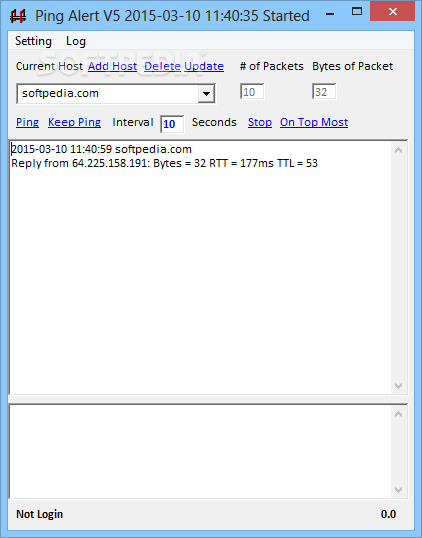
Network administrators need to be constantly aware of data traffic. As such, you might want to know the availability status of a particular target, and this can be done through a ping operation. Ping Alert is a small ping tool that can automatically ping a host, with multiple configuration options to control the process.
At the first glance, Ping Alert is nothing more than a simple tool designed to ping a preconfigured host, but the application hides a lot more than that, just so you don’t feel overwhelmed from the start.
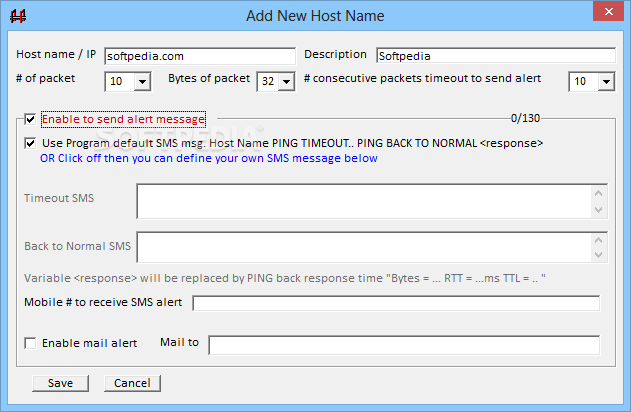
First of all, the program provides a separate menu to manage the hosts, so you need to add the host name and description, the number of packets and the bytes of each packet.
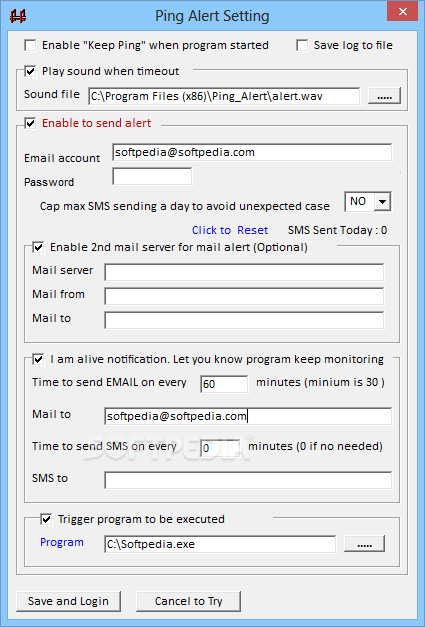
What's more, in case the program record timeouts it can notify the user using two different methods: either by SMS or by mail.
That's right, it can send you a SMS to your mobile phone in case you own a SMS4Mail.com account, so you may need to input your username and password for that too.
The main window of the app is split into multiple panels to let you easily view the information, with a separate log window that shows reply, bytes and TTL for each ping attempt.
Since it's such a small app, it's only natural to expect a flawless experience. And yes, Ping Alert works like a charm on all Windows versions, without affecting system performance at all.
All things considered, Ping Alert is an interesting product, mostly thanks to the SMS support that helps you get information right on your mobile phone. Other than that, it's just a simple utility that does nothing more than to ping a preconfigured host.
Download Hubs
Ping Alert is part of these download collections: Ping Clients
What's new in Ping Alert 5.6:
- Mail alert bug fixed
Ping Alert 5.6
add to watchlist add to download basket send us an update REPORT- PRICE: Free
- runs on:
- Windows All
- file size:
- 2.8 MB
- filename:
- ping_alert_v5.6.exe
- main category:
- Network Tools
- developer:
- visit homepage
Windows Sandbox Launcher

7-Zip

Microsoft Teams

IrfanView

ShareX

Context Menu Manager

4k Video Downloader

Bitdefender Antivirus Free

Zoom Client

calibre

- Bitdefender Antivirus Free
- Zoom Client
- calibre
- Windows Sandbox Launcher
- 7-Zip
- Microsoft Teams
- IrfanView
- ShareX
- Context Menu Manager
- 4k Video Downloader