
Convert Excel (XLS,XLSM,XLSX) to JPG, BMP, GIF, TIF, TGA, RLE, PNG, EMF, WMF by clicking a couple of buttons, increasing productivity and avoiding any headaches. #Excel To Image #XLS to JPG #XLS to JPEG #Excel2Image #XLS2JPG #XLS2JPEG

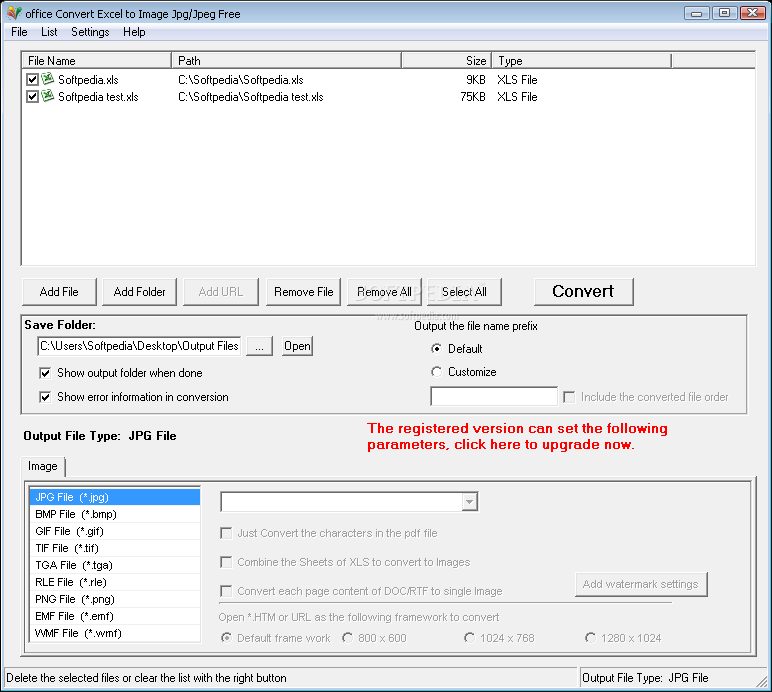
office Convert Excel to Image Jpg/Jpeg Free is an application with a pretty self-explanatory title - it allows you to convert Excel documents to the JPG format, but also to other image extensions, such as BMP, GIF, TGA and PNG.
The interface of the program is plain and easy to work with. Documents can be imported into the queue by using the file browser only, since the "drag and drop" method is not supported. Batch processing is allowed.
In the list you can check out the name, source path, size and type of each file. After you specify the output destination and format, you can proceed with the conversion task.
You can enable office Convert Excel to Image Jpg/Jpeg Free to show the output folder when done and error information in the conversion, remove an item from the list or clear the entire queue, save and load the list, change the interface language, and more.
The straightforward program requires a moderate amount of system resources, quickly finishes a task and didn't freeze, crash or pop up errors during our tests. The text layout is preserved at a very good quality.
On the other hand, the program cannot convert images within Excel documents. Plus, there is no help file available and some essential features are disabled in the unregistered version. We recommend office Convert Excel to Image Jpg/Jpeg Free with reservations.
office Convert Excel to Image Jpg/Jpeg Free 6.4
add to watchlist add to download basket send us an update REPORT- runs on:
- Windows All
- file size:
- 9.2 MB
- filename:
- office-convert-excel-to-image-jpg-jpeg-free.exe
- main category:
- Office tools
- developer:
- visit homepage
Microsoft Teams

Bitdefender Antivirus Free

paint.net

Windows Sandbox Launcher

4k Video Downloader

Zoom Client

IrfanView

7-Zip

calibre

ShareX

- 7-Zip
- calibre
- ShareX
- Microsoft Teams
- Bitdefender Antivirus Free
- paint.net
- Windows Sandbox Launcher
- 4k Video Downloader
- Zoom Client
- IrfanView