
Make Adobe Reader start and operate faster by disabling some unneeded plugins, deactivating the start-up splash screen and automatic update, and performing other tweaks as well. #Adobe Reader #PDF reader #Quick PDF reader #PDF #Speedup #Reader

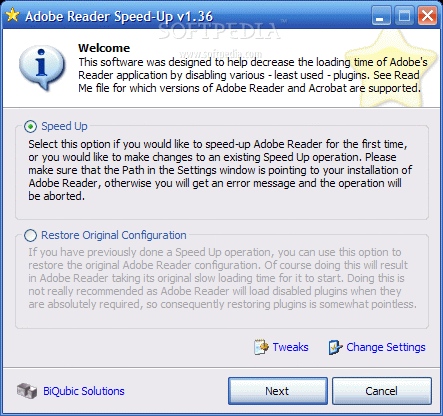
A lot of people use Adobe Reader nowadays because it pretty much sets the standards when it comes to opening Portable Document Format (PDF) files. In case you find Adobe's software to be slower in operation, a tiny utility can help you make it run a bit faster, both when loading and when running.
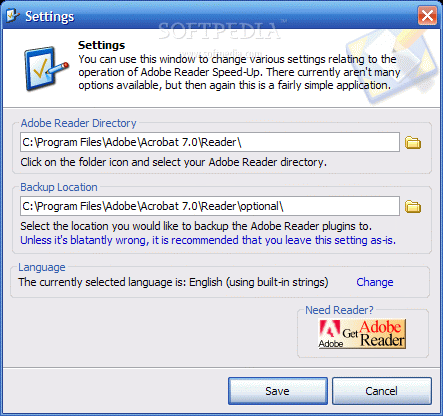
Called Adobe Reader SpeedUp, this lightweight application has no installation kit, so you can simply start it by double-clicking the executable.
When running it for the first time you will find that the interface is quite user friendly, even though not very appealing. Adobe Reader SpeedUp contains detailed information about each operation you can carry out and thus appeals even to less experienced users.
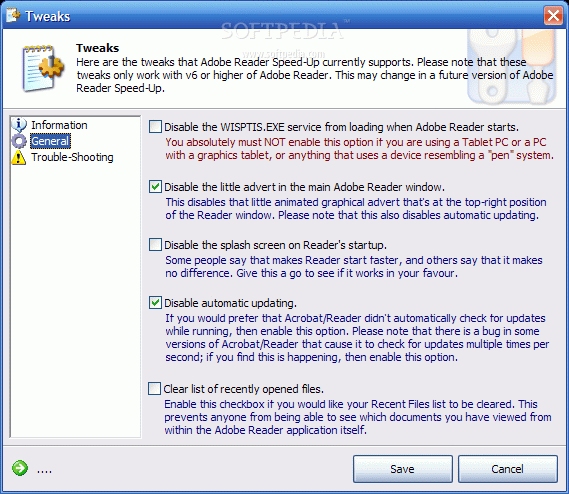
The software performs a series of tweaks that involve, among other things, disabling some unneeded plugins. Adobe Reader SpeedUp can also deactivate the start-up splash screen, automatic update or clear the list of recently opened files for faster loading.
As soon as all these optimizations are performed, you will notice that it takes quite a less time for Adobe Reader to load and to render the PDF files.
A neat trick up Adobe Reader SpeedUp's sleeve is its ability to reinstate the settings it modifies. Thus, you can easily choose the 'Restore Original Configuration' option and everything in Adobe Reader will revert to the original state.
If you use Adobe Reader as the default program for handling PDF documents and notice it performs under your expectations, this nifty tool could be pretty useful. If you are not satisfied by the performance enhancements it comes with, simply restore the factory settings.
What's new in Adobe Reader SpeedUp 1.36:
- Added: Auto-detection for v8 of Reader/Acrobat. Should be OK until v11.
- Added: Hungarian translation by Illovszky Richard.
- Other: Replaced original Polish translation with a new
- working version by Marcin Wawer.
Adobe Reader SpeedUp 1.36
 Softpedia Editor's Pick
add to watchlist
add to download basket
send us an update
REPORT
Softpedia Editor's Pick
add to watchlist
add to download basket
send us an update
REPORT
- runs on:
- Windows All
- file size:
- 244 KB
- filename:
- ar-speedup.zip
- main category:
- Office tools
- developer:
- visit homepage
ShareX

IrfanView

Microsoft Teams

4k Video Downloader

7-Zip

Zoom Client

Bitdefender Antivirus Free

Context Menu Manager

Windows Sandbox Launcher

calibre

- Context Menu Manager
- Windows Sandbox Launcher
- calibre
- ShareX
- IrfanView
- Microsoft Teams
- 4k Video Downloader
- 7-Zip
- Zoom Client
- Bitdefender Antivirus Free
