
Write Cyrillic letters without using a dedicated keyboard. #Russian keyboard #Write Russian #Type Cyrillic #Cyrillic #Keyboard #Russian
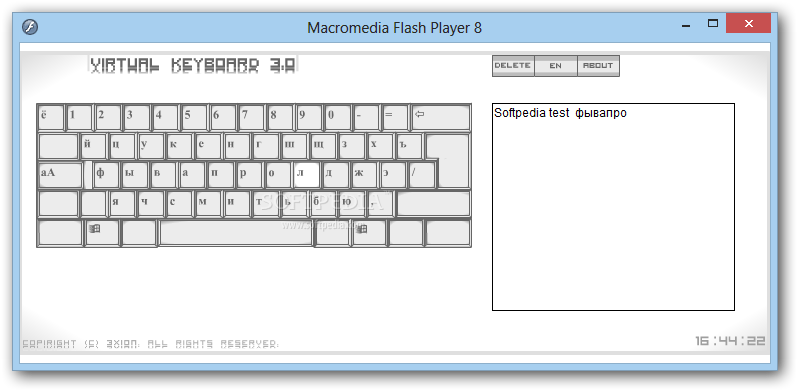
Users who are not native English speakers might find it hard to type texts in their own language, especially when it comes to Russian which uses Cyrillic alphabet. Virtual Keyboard can help users overcome such shortcomings as it allows them to type using the letters they want without purchasing a custom keyboard.
The application is basically a Flash tool and it allows users to switch the language of the virtual keyboard between English and Russian, depending on their necessities.
While used in English, it is no different than a standard QWERTY keyboard, and pressing certain keys types the corresponding letters, within the same window. When the language is changed to Russian, each Latin letter is replaced by a Cyrillic one and users can rely on the mouse to type the word they need.
Once they get accustomed to the new layout, one can also use the keyboard to type texts in Russian, thus saving the time spent using the mouse.
The only drawback of Virtual Keyboard is that users cannot correct any of their texts without erasing all letters until they get to the mistaken word. One workaround for this is to copy the text to a standard text editor, such as Notepad or Wordpad, then apply the corrections with ease.
The utility also features a Delete all button so that the current text can be removed in an instant and get the window ready for another typing session.
Despite its simplistic looks, Virtual Keyboard might prove as a great asset to those who want to write Russian texts and do not want the fuss and complexity of other specialized text editors. It is simple to use and it gets the job done, though it might take some time getting used to using the mouse to type a text.
What's new in Virtual Keyboard 3.0:
- Russian and english spreading keyboards
- Sound acknowledgement of the set of the buttons
- Suitable interface of the program
- Small size of the program
Virtual Keyboard 3.0
add to watchlist add to download basket send us an update REPORT- runs on:
- Windows All
- file size:
- 764 KB
- filename:
- virtual_keyboard_3.0.rar
- main category:
- Office tools
- developer:
- visit homepage
IrfanView

Windows Sandbox Launcher

calibre

7-Zip

ShareX

Microsoft Teams

Zoom Client

Context Menu Manager

Bitdefender Antivirus Free

4k Video Downloader

- Context Menu Manager
- Bitdefender Antivirus Free
- 4k Video Downloader
- IrfanView
- Windows Sandbox Launcher
- calibre
- 7-Zip
- ShareX
- Microsoft Teams
- Zoom Client
