
Perform conversions from any international currency to a number of other currencies with updated exchange rates and save them in a dedicated file. #Convert currency #Currency conversion #Exchange rate #Currency #Exchange #Monetary
The modern world is heavily sinked into capitalism, and every country has its own monetary system, with differences between all of them, depending on each country’s financial status. Balance changes every day, and important businesses need to be updated, with a simple application like Currency Converter capable of serving these needs.
The application was built on the Java platform, so before you go off checking the set of features, you need to make sure that Java Runtime Environment is installed on your PC. However, the application itself doesn’t take you through a setup process, which means you can carry it around on a removable flash drive to use wherever necessary.
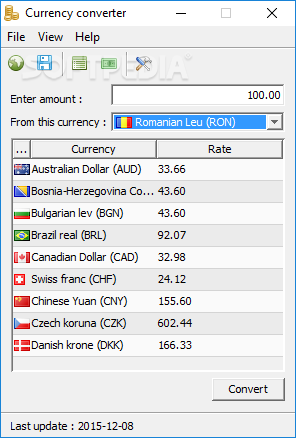
When launched, the application brings up a compact main window, with a list of related currency symbols, as well as rate, several fields that need to be filled in with proper values, as well as the upper toolbar with general functions you need. Before anything can be accomplished, you need to update the currency list. This takes a little while, but you need to keep the Internet connection active.
Online sources are pretty accurate, and the application can neatly tell differences with an updated currency list. For more accuracy, there’s an option to make the list automatically update every now and then. Input is pretty simple, with a value field for amount, and a drop-down menu for the target currency. Sadly, you don’t get to choose related results, and those provided might not be those you’re looking for.
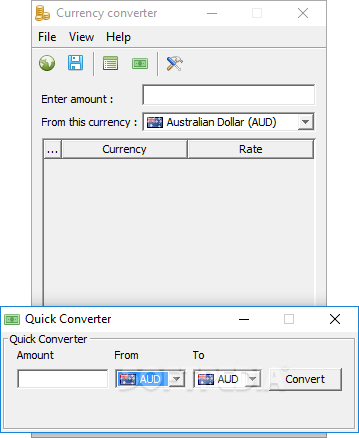
On the other hand, there’s a lightweight component you can use to bypass this issue. When accessed, the individual converter only requires you to specify amount, source, and target currency, with results shown in real time. There’s also the possibility to export results to CSV files.
To sum it up, Currency Converter manages to live up to expectations by providing a simple set of tools with which to perform accurate monetary conversion. Exchange rates can be updated automatically, while conversion logs can be saved to file for later analysis, making this application worth a try overall.
Currency Converter 1.3
add to watchlist add to download basket send us an update REPORT- runs on:
- Windows All
- file size:
- 196 KB
- filename:
- cConverter.v1.3.zip
- main category:
- Others
- developer:
- visit homepage
Bitdefender Antivirus Free

IrfanView

Zoom Client

paint.net

calibre

7-Zip

Windows Sandbox Launcher

Microsoft Teams

4k Video Downloader

ShareX

- Microsoft Teams
- 4k Video Downloader
- ShareX
- Bitdefender Antivirus Free
- IrfanView
- Zoom Client
- paint.net
- calibre
- 7-Zip
- Windows Sandbox Launcher