
Budget manager that helps you keep track of your finances, create a reserve study for your homeowner’s association, and generate all sorts of reports. #Reserve manager #Finance manager #Budget manager #Reserve #Finance #Budget


Lucid Reserve Study is a budget manager whose purpose is to help you create a reserve study of your homeowner’s association. It allows you to track your finances and find ways to reduce your monthly homeowner’s association fees.
At the end of the installation process, you are asked to choose between the Standard and Professional version of the program. The edition put to the test in our case is the Professional one.
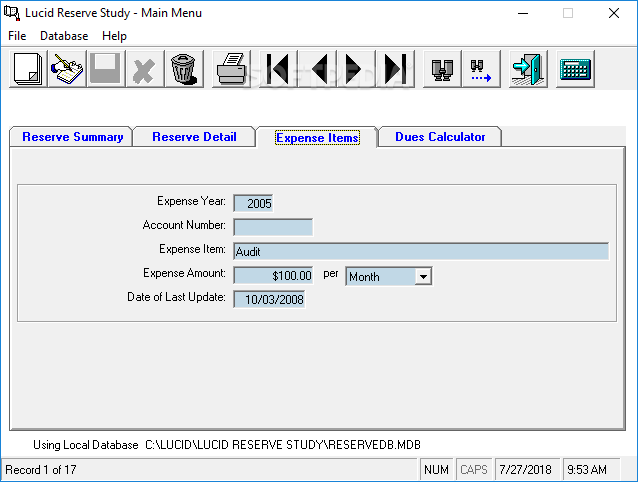
The tool reveals a straightforward design and provides a help manual in case you need further information about the setup parameters. A multi-tabbed environment is employed for helping you quickly switch between the Reserve Summary, Reserve Detail, Expense Items, and Dues Calculator.
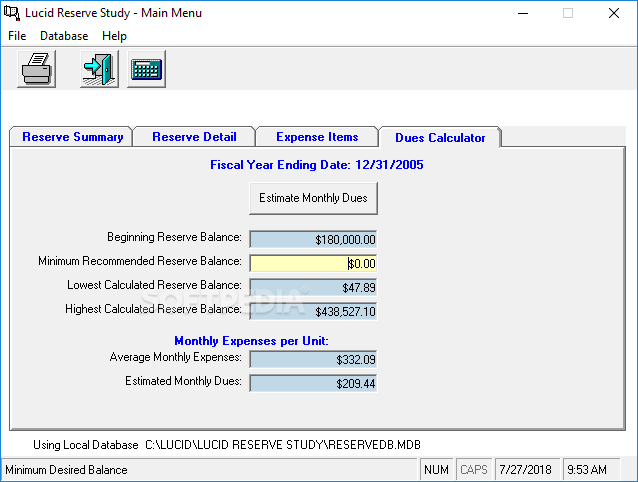
You are allowed to define a new reserve summary by entering details about the fiscal year’s ending date, estimate inflation rate, estimated interest rate, current reserve balance, number of units in complex, and other parameters. The utility comes packed with a calculator for helping you find out the annual and monthly reserve contributions.
Lucid Reserve Study gives you the possibility to store information about the reserve study year, account number, component description, estimated replacement cost, estimated useful years, estimated remaining years, date of last update, or other details.
What’s more, you can enter data about expense items, namely year, account number, expense item, amount, as well as date of the last update.
Lucid Reserve Study offers support for a calculator which is able to estimate monthly dues fees for each unit. Optionally, you are allowed to alter the minimum reserve balance for calculations based on a predetermined limit.
You can compact the database and set up a new association by writing info about the name and automatically assigning an ID. You can jump to the next or previous record, go to the first or last record, perform searches, as well as edit or delete entries.
The Professional version of the app works and looks the same as the Standard one. It only comes with some extra features meant to help you generate reports and track up to nine different associations. Plus, you can print or export the reports to Excel files.
You may generate all sorts of reports, such as annual expenditure detail, association, contribution and fund breakdown, executive summary, expense detail, monthly dues by year, percent funded, reserve component list, reserve funding analysis, and reserve funding summary.
Lucid Reserve Study proves to be a straightforward budget manager that comes packed with several handy features. It’s easy to work with so you are not going to spend a lot of time tweaking the dedicated parameters.
What's new in Lucid Reserve Study 1.03.0027:
- Minor program fixes
Lucid Reserve Study 1.03.0027
add to watchlist add to download basket send us an update REPORT- runs on:
-
Windows 10 32/64 bit
Windows 2008
Windows 2003
Windows 8 32/64 bit
Windows 7 32/64 bit
Windows Vista 32/64 bit
Windows XP 32/64 bit
Windows 2K - file size:
- 32.7 MB
- filename:
- RESERVE.zip

- main category:
- Others
- developer:
- visit homepage
calibre

IrfanView

ShareX

Microsoft Teams

Context Menu Manager

Bitdefender Antivirus Free

Windows Sandbox Launcher

7-Zip

4k Video Downloader

Zoom Client

- 7-Zip
- 4k Video Downloader
- Zoom Client
- calibre
- IrfanView
- ShareX
- Microsoft Teams
- Context Menu Manager
- Bitdefender Antivirus Free
- Windows Sandbox Launcher