
This is a Bingo Caller that calls numbers 1-90 for users who would like to play Bingo without having to waste time on calling numbers themselves. #Call Numbers #Genreate Number #BINGO gENERATOR #Generate #Bingo #Number

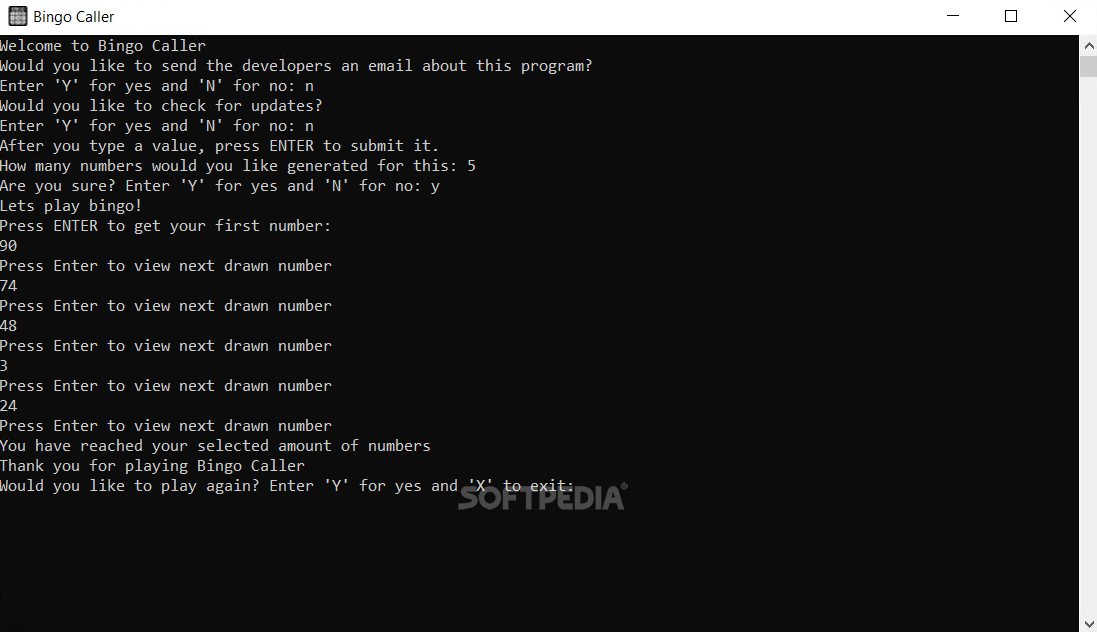
With most applications nowadays developers strive to offer some type of life-changing functionality, something to stand out. Bingo Caller doesn't really attempt to do that. Instead, it automates number selection for Bingo games, and it does that simply, without too much fuss. It's so simplistic, in fact, that it doesn't even have an interface to surprise the user with. It's basic by all means, but it functions as intended at the same time.
You might be shocked to see a CMD window once the app is installed and executed. Don't be. There will be a couple of program-related questions that need to be answered, such as update checks and license activation. After this part is done, you can go ahead and decide how many numbers you'd like to have generated. The application will prompt you to press enter each time you want one of the numbers to be shown. The number draw is consecutive, as it should be when playing Bingo.
The application doesn't necessarily have to be used for drawing numbers in bingo games. The name might imply that, but if you need to select random numbers between 1 and 90 for any other purpose, go ahead and do it. Nobody will know. At the same time, the application will allow the user to select how many numbers are to be randomly picked. You can have as many numbers generated as your heart desires. The procedure is simple. The CMD-like window will ask you where there's a choice to be made. Simply input your answer and press Enter.
Bingo Caller is not necessarily an application worth grabbing unless you're looking for a way to randomly select numbers for use with this particular type of game. The automation process is transparent and fool-proof. Still, there's little else you could do with this application which means there won't be lots of users looking into it. Even those who will use it will probably do that a couple of times max.
What's new in Bingo Caller 6.0.0.26:
- Spellings Corrected
- Removed option to access updated in Bingo Caller
- Activation Server Added
Bingo Caller 6.0.0.26
add to watchlist add to download basket send us an update REPORT- runs on:
-
Windows 10 32/64 bit
Windows 2008 64 bit
Windows 8 32/64 bit
Windows 7 32/64 bit
Windows Vista 32/64 bit
Windows XP 32/64 bit - file size:
- 4.5 MB
- filename:
- Bingo_Caller_Installer.zip
- main category:
- Others
- developer:
Microsoft Teams

7-Zip

Bitdefender Antivirus Free

paint.net

Windows Sandbox Launcher

calibre

ShareX

IrfanView

4k Video Downloader

Zoom Client

- IrfanView
- 4k Video Downloader
- Zoom Client
- Microsoft Teams
- 7-Zip
- Bitdefender Antivirus Free
- paint.net
- Windows Sandbox Launcher
- calibre
- ShareX