
Clean Windows's temporary files immediately or on login .. #Erase temp #File cleaner #Temp eraser #Erase #Cleaner #Remover

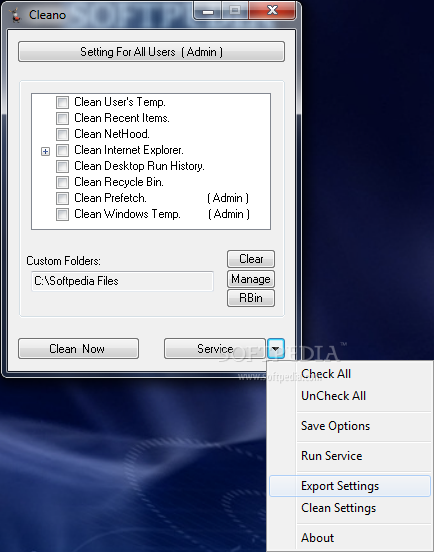
Cleano is a lightweight and simple-to-use program which allows you to clean up temporary files on your computer, in order to free up space and boost the performance level of your system.
This is a portable software, so installation is not necessary. It means that Cleano can be stored on a removable device (like a USB flash drive).
From this point on, you can always have it with you when you're on the go, since you can plug it into any computer and directly run its executable file. On top of that, there will be no further modifications made to the Windows registry entries.
The interface of Cleano is based on a small, standard window in which you can enable the tool to clear user temporary files, recent items, NetHood, Internet Explorer items (cache, cookies, history, address bar history), desktop Run history, Recycle Bin, prefetch and Windows temporary files. The latter two options require administrative privileges.
You can add custom folder to the cleaning process, as well as enable the tool to automatically run at system startup. In the latter case, you can set the delay time and make Cleano exit when it finishes, schedule a cleaning job on a specific time interval and hide the system tray icon, as well as enable to clean silently (i.e. running in the background of the apps) or when logging off.
The simple-to-use program requires a very low amount of system resources, has a good response time, quickly finishes a task and didn't freeze, crash or pop up errors during our tests. Unfortunately, it doesn't notify you in any way when the clean job is complete.
Also, the tool doesn't provide you with the possibility of scanning the aforementioned areas before cleaning and you cannot view a log file. We had expected to find more "cleanable" areas available (e.g. web browsers like Chrome, Firefox, Opera). We recommend Cleano with reservations.
Cleano 1.31
add to watchlist add to download basket send us an update REPORT- PRICE: Free
- runs on:
- Windows All
- file size:
- 184 KB
- filename:
- Cleano.zip
- main category:
- Tweak
- developer:
- visit homepage
4k Video Downloader

ShareX

Windows Sandbox Launcher

7-Zip

Bitdefender Antivirus Free

Context Menu Manager

Microsoft Teams

IrfanView

Zoom Client

calibre

- IrfanView
- Zoom Client
- calibre
- 4k Video Downloader
- ShareX
- Windows Sandbox Launcher
- 7-Zip
- Bitdefender Antivirus Free
- Context Menu Manager
- Microsoft Teams