
Popular viewer for text files containing ASCII Art and description files (NFO/DIZ/TXT). #NFO Viewer #ASCII Viewer #View NFO #NFO #ASCII #Viewer


The NFO format refers to an ASCII text file most commonly used to provide release notes for a software program. The typical association for this file format is Notepad and while it manages to successfully display the information included in NFO files, a dedicated viewer can often provide a more compact and stylish panorama (especially if ASCII art is included).
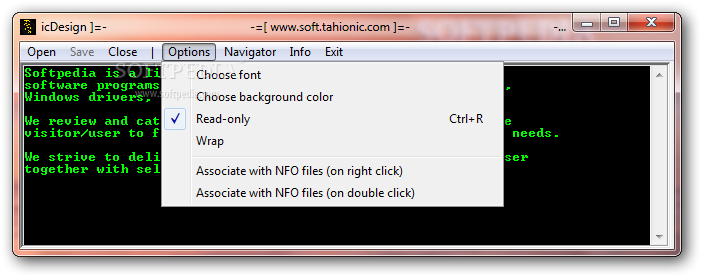
One of the most appreciated utilities of this kind is Compact NFO Viewer, a small and portable utility that allows you to view NFO / DIZ / TXT files. It doesn’t require installation and features a simple interface and a few menus that offer quick access to opening / saving files.
Usage is simple: just open the browser and search for the respective NFO file (it instantly loads). If there are any links in the document, NFO viewer highlights them and makes them clickable. The Options menu enables you to set up the font and background color of the text and allows you to make the file read-only.
You can also opt to attach an Explorer Context Menu item in order to have faster access to the program. Another possibility is to directly associate all NFO files with this utility, so that when you double click them, they will open directly in Compact NFO Viewer.
This application is an efficient viewer for NFO files, but can process DIZ or TXT files as well. Its simplicity and ease of use makes it accessible to all audiences; game players and web developers especially can get a kick out of it.
Compact NFO Viewer 1.5.6
add to watchlist add to download basket send us an update REPORT- runs on:
- Windows All
- file size:
- 670 KB
- filename:
- Compact-NFO-Viewer.exe
- main category:
- Others
- developer:
- visit homepage
7-Zip

Windows Sandbox Launcher

calibre

Bitdefender Antivirus Free

ShareX

paint.net

Zoom Client

Microsoft Teams

4k Video Downloader

IrfanView

- Microsoft Teams
- 4k Video Downloader
- IrfanView
- 7-Zip
- Windows Sandbox Launcher
- calibre
- Bitdefender Antivirus Free
- ShareX
- paint.net
- Zoom Client