
Quickly converts measurement units in a highly intuitive interface, featuring support for adding custom units, geared toward all user levels. #Unit Converter #Temperature converter #Pressure converter #Unit #Converter #Temperature

Converting units, regardless if we're talking about time, length, speed, volume or pressure, takes just a few seconds since many websites lets you do it on the fly. But in case you want to use a converter straight from your desktop without having go online every time, you will need a tool like Unit Converter.
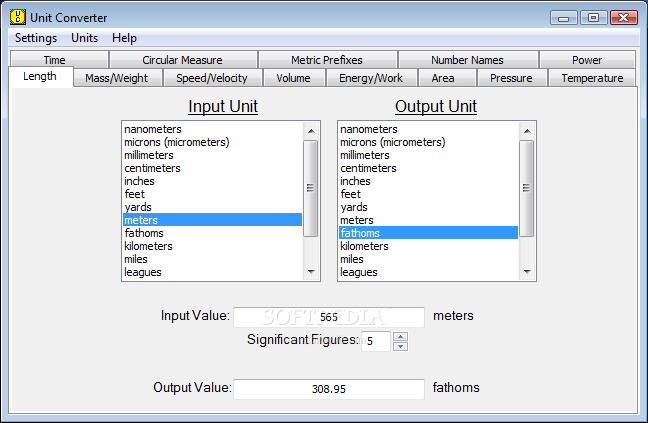
The application is absolutely surprising from the point of view of supported units, coming with a wide array of options such as time, circular measure, metric prefixes, number names, power, length, mass, speed, volume, energy, temperature, pressure and area.
Everything is nicely displayed in a clean and user friendly interface and, as we found out while testing it, the whole conversion process basically needs just a few clicks and a handful of seconds. You are prompted to choose the input and the output units then type in the value you wish to convert.
The conversion is performed in real time, so you won't have to press a dedicated button for it, which again saves time. A particularly useful function is the adjustable precision, a feature you can use to decide how many figures (up to ten) should be displayed.
The 'Settings' menu is quite handy for those who have problems working with so many units because it comes with a special option that enables you to organize them by magnitude or alphabetically.
As a conclusion, Unit Converter is one of the simplest and most efficient tools you can get your hands on. It works fast and the support for so many units is one of the biggest advantages of this utility.
Download Hubs
Unit Converter is part of these download collections: Unit Converters
What's new in Unit Converter 2.3:
- Added an option to diplay radians in terms of pi.
- Added deg-min-sec (degrees, minutes, seconds) to circular measure.
- Fixed a problem with division in user input.
Unit Converter 2.3
add to watchlist add to download basket send us an update REPORT- runs on:
- Windows All
- file size:
- 3.1 MB


- main category:
- Others
- developer:
- visit homepage
Zoom Client

Context Menu Manager

4k Video Downloader

Microsoft Teams

Windows Sandbox Launcher

7-Zip

calibre

IrfanView

ShareX

Bitdefender Antivirus Free

- IrfanView
- ShareX
- Bitdefender Antivirus Free
- Zoom Client
- Context Menu Manager
- 4k Video Downloader
- Microsoft Teams
- Windows Sandbox Launcher
- 7-Zip
- calibre