
A simple-to-use software application that lets you manage context menu items of the file objects in Windows Explorer, and add separators. #Shell enhancement #Context menu #Context tweak #Context #Menu #Shell


This is the portable edition of Fast Explorer. This app lets you tweak Windows settings by integrating new entries into the shell. It is simple to work with it, thanks to the Explorer-based environment.
Since installation is not a prerequisite, you can drop the program files anywhere on the hard drive and run the executable. Alternatively, you can move Fast Explorer to a USB flash disk or similar storage unit, in order to run it on any computer with minimum effort.
An important aspect to take into account is that the Windows registry area does not receive new updates, and files are not left behind on the hard disk after removal.
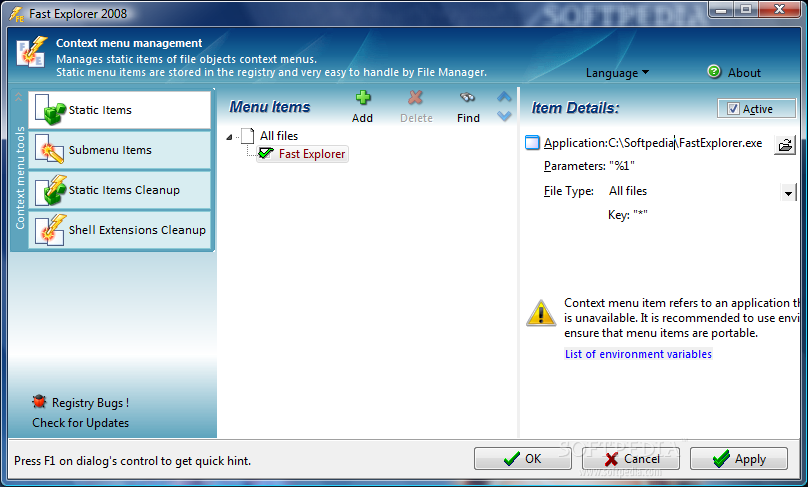
The interface of Fast Explorer is clean and intuitive. You can add new items to the menu and point out the path to their EXE, BAT or CMD file. You can add submenu items and separators, assign icons, and enable dynamic items.
It is possible to clean up the static items and filter them by type (e.g. all files and folders, entire network, all printers, audio CD), use a search function when dealing with numerous entries, as well as delete unused context menu extensions from the registry.
Fast Explorer is light on the system resources, using a low-to-moderate quantity of CPU and RAM. It has a good response time and carries out a task rapidly, without causing the operating system to hang, crash or pop up error dialogs. Fast Explorer provides a straightforward method for managing context menu entries, and it can be used by all levels.
What's new in Portable Fast Explorer 2008 3.1.11.430:
- added support for perceived types (introduced in Windows XP) including a set
- of predefined PerceivedTypes: Image, Text, Audio, Video, Compressed and System;
- copy and paste for static and dynamic menu items;
- relaxed user priveleges for using of Fast Explorer Context Menu Extension DLL: administrative rights on local machine are required to edit, enable and disable dynamic menu items. Regular users can enjoy installed context menu items;
Portable Fast Explorer 2008 3.1.11.430
add to watchlist add to download basket send us an update REPORT- portable version
- This is the portable version of the application. An installable version is also available: Fast Explorer 2008
- runs on:
- Windows All
- file size:
- 1.9 MB
- filename:
- fesetup.zip

- main category:
- Portable Software
- developer:
- visit homepage
calibre

Microsoft Teams

7-Zip

Context Menu Manager

IrfanView

Zoom Client

Bitdefender Antivirus Free

4k Video Downloader

ShareX

Windows Sandbox Launcher

- 4k Video Downloader
- ShareX
- Windows Sandbox Launcher
- calibre
- Microsoft Teams
- 7-Zip
- Context Menu Manager
- IrfanView
- Zoom Client
- Bitdefender Antivirus Free