
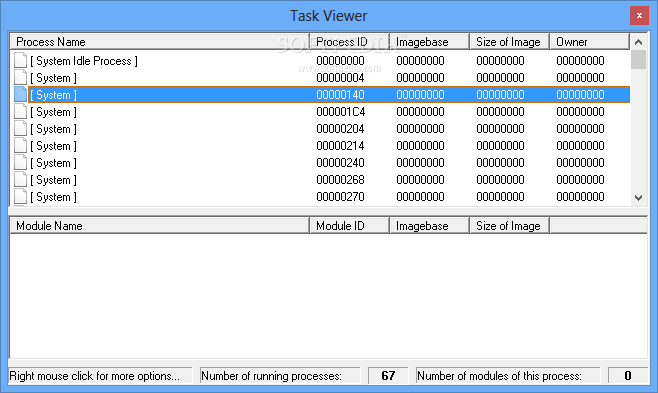
Load the target file, dump processes, view information about processes and modules, as well as to load a process/module into the application. #Edit PE file #PE builder #PE viewer #Builder #Editor #Edit
Working with Portable Executable (PE) files is not an easy job as it requires experience and knowledge as well as specialized utilities that may not be accessible to all users. Among the tools that aim to make this task more easy to perform even by non-professionals, Peditor offers a good set of features and is not as difficult to use as other programs.
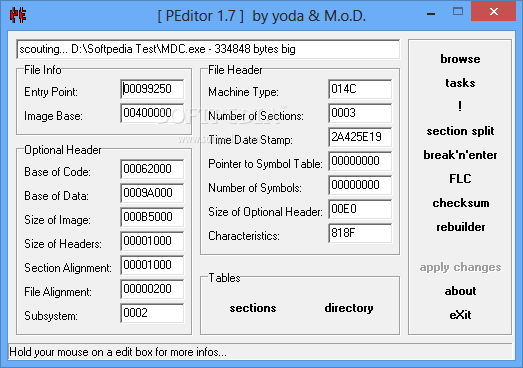
The application has all the functions stacked on the right side of the simple GUI, while most of the main window is reserved for file information and header data. Thus, after loading an executable in the corresponding field of , you can start working on that file.
Once the PE executable is read, you can use the edit boxes for specifying the entry point and the corresponding image base. Also, you can check out file header details like machine type, number of sections, time date stamp, number of symbols as well as pointer to symbol table.
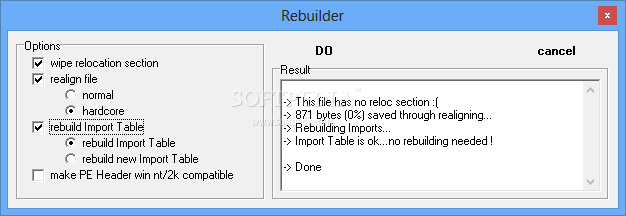
With Peditor, optional header information can be set for base of code and of data, headers and image size, file and section alignment values and also subsystem data. The 'Rebuild' command brings up a window where you can set the operation options and apply them, while monitoring the results in real-time in the dedicated area.
From the Directory Table Viewer module of the program you can view the relative virtual addresses (RVA) as well as their size for memory locations. The information is available for table export and import, recourse, exception, security, debug and many more. Other actions supported by Peditor include 'section split', 'break'n'enter' and 'section split'.
Overall, the software is clearly more accessible for those who worked with this type of files and experience in this respect is not only an advantage, but more like a requirement. A detailed guide would make Peditor reach a larger user base, but if you are already used to handle this kind of tools, this one will surely not let you down.
What's new in PEditor 1.7:
- Import Table rebuilder recoded (not win NT/2k compatible any more, resides now in rebIT.dll...rebIT.txt for more infos)
- Realigner recoded (resides now in realign.dll)
- Export Table Viewer recoded
- Import Table Viewer: now one can add new Imports, one can delete Image Import Descriptors, a refresh button was added (useful for long reversing sessions), one can now use return in many edit boxes
PEditor 1.7
add to watchlist add to download basket send us an update REPORT- runs on:
- Windows All
- file size:
- 407 KB
- filename:
- PEditor1.7.zip
- main category:
- Programming
- developer:
calibre

Zoom Client

ShareX

7-Zip

Windows Sandbox Launcher

Bitdefender Antivirus Free

Microsoft Teams

4k Video Downloader

Context Menu Manager

IrfanView

- 4k Video Downloader
- Context Menu Manager
- IrfanView
- calibre
- Zoom Client
- ShareX
- 7-Zip
- Windows Sandbox Launcher
- Bitdefender Antivirus Free
- Microsoft Teams