
Checks the state of the .NET Framework installation on your computer and verifies the integrity of the files, providing support for versions from 1.0 to the latest. #NET Framework Version #Version Checker #Check NET Framework #NET Framework #Verification #Version
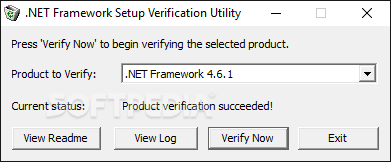
The .NET Framework Setup Verification Utility provides you with a tool to check on the state of the various .NET Framework versions found on your system. It verifies the corresponding files and folders as well as registry keys for every found iteration of the .NET Framework. Moreover, the program can also validate whether applications requiring .NET Framework can launch and perform properly on your PC.
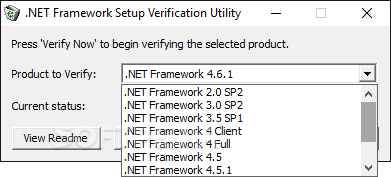
This particular software successfully attests the integrity of the .NET Framework starting with its first version (1.0 alongside its updates - 1.1 and 1.1 SP1) all the way to versions 4 and 4.5. The .NET Framework Setup Verification Utility only displays the versions it discovers on the computer. In order for it to list all of them, you must execute the following command: netfx_setupverifier.exe /q:a /c:"setupverifier.exe /a"
If any of the .NET Framework versions presents errors, then you can try the Microsoft .NET Framework Repair Tool to fix them or perform a complete reinstallation of that specific iteration after running the .NET Framework Cleanup Tool.
The whole procedure marks the missing or corrupted files as warnings, while flagging the AWOL registry keys or the failure to start a sample program as errors. These special cases also cause the .NET Framework Setup Verification Utility to return errors at the end of the checking process.
Log files are also an important part of the software, as they contain vital information about the condoned tasks and their possible errors. The .NET Framework Setup Verification Utility usually creates two log files to determine the actual health status of any of the selected versions.
The .NET Framework Setup Verification Utility comes in very handy every time you come across an issue regarding your .NET Framework installed versions. A simple verification is imperative at that exact time, followed by any of the above mentioned workarounds, in order to ensure your system can flawlessly run any .NET Framework application.
What's new in .NET Framework Setup Verification Utility 17-05-2018:
- Add the ability to verify the .NET Framework 4.7.2.
.NET Framework Setup Verification Utility 17-05-2018
add to watchlist add to download basket send us an update REPORT- runs on:
- Windows All
- file size:
- 240 KB
- filename:
- netfx_setupverifier_new.zip
- main category:
- System
- developer:
- visit homepage
calibre

4k Video Downloader

Bitdefender Antivirus Free

Microsoft Teams

Zoom Client

Context Menu Manager

IrfanView

ShareX

7-Zip

Windows Sandbox Launcher

- ShareX
- 7-Zip
- Windows Sandbox Launcher
- calibre
- 4k Video Downloader
- Bitdefender Antivirus Free
- Microsoft Teams
- Zoom Client
- Context Menu Manager
- IrfanView