
A small tool that allows you to easily password protect any running program / document!. #Lock application #Create password #Protect application #Locker #Lock #Restrict

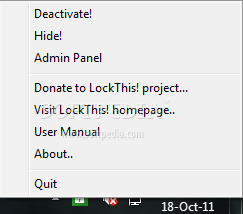
LockThis! is an application that you can use to password-protect active programs.
The purpose of the app is pretty simple: users who want to lock some of the active windows can simply minimize them to Tray and set up a password, so that no one can restore them without the right pass.
Well, LockThis! was designed to stay in the Tray and simply wait for new windows to get minimized in order to lock them either with the standard password or with a new one defined by the user.
In order to minimize a Window to Taskbar and password-protect it, users are required to press the CTRL key while hitting the minimize button. LockThis! can use either the administrator pass for all minimized window or a different one for each window.
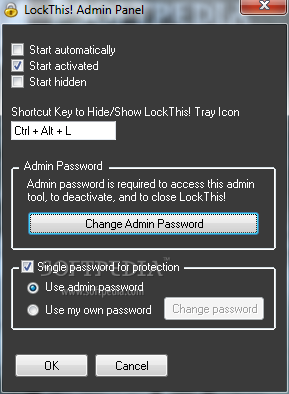
The administration panel can be only accessed with the right password, but it gives you the option to set up a shortcut key to hide or show the Tray icon, change the password and enable a single password for all protected windows.
Right-clicking the Tray icon lets you disable the app on the go and terminate the protection system.
One of the major setbacks however is that LockThis! can be easily killed from Task Manager, obviously without a password, which means that any user in front of the monitor gain access to the protected windows.
Overall however, LockThis! is quite an interesting project and the future updates can only make it better. It’s impressively easy to use and doesn’t offer more than the essential configuration options.
What's new in LockThis! 1.2:
- Single common password for protection
LockThis! 1.2
add to watchlist add to download basket send us an update REPORT- runs on:
- Windows All
- file size:
- 528 KB
- filename:
- lt-setup.exe

- main category:
- Security
- developer:
Zoom Client

Bitdefender Antivirus Free

Microsoft Teams

7-Zip

ShareX

IrfanView

calibre

Context Menu Manager

4k Video Downloader

Windows Sandbox Launcher

- Context Menu Manager
- 4k Video Downloader
- Windows Sandbox Launcher
- Zoom Client
- Bitdefender Antivirus Free
- Microsoft Teams
- 7-Zip
- ShareX
- IrfanView
- calibre
