
Clean internet history, cookies, temporary internet files and your index.dat. #History cleaner #Clean cookies #Erase temporary files #Cleaner #Eraser #Remover

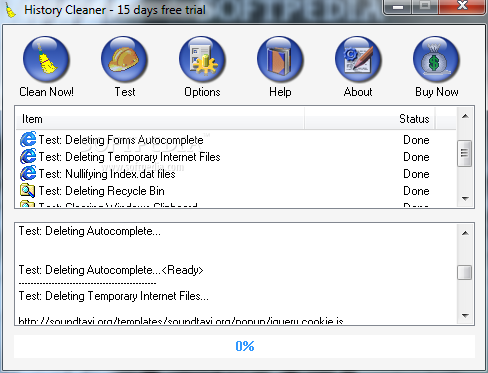
History Cleaner is one of the apps supposed to help you keep the computer clean by removing browser data, such as history, cookies and cache.
This isn’t the first program supposed to do that, but History Cleaner tries to make a name for itself with the help of a very simple approach, so if you’re okay with the standard settings, it’s enough to press the “Clean Now!” button from the first launch.
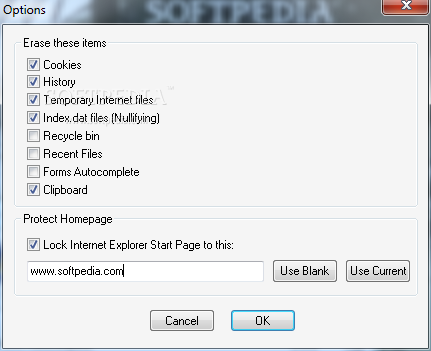
Otherwise, it’s very important to have a look in the configuration screen and select the elements you want to remove, with available options including cookies, history, temporary Internet files, Index.dat files, Recycle Bin, recent files, forms autocomplete and clipboard.
What’s more, History Cleaner comprises a separate feature to lock Internet Explorer start page and thus block spyware that may change it automatically.
A complete cleaning process doesn’t take more than a few seconds, but a moderate CPU usage is very likely to be experienced during this time, especially if History Cleaner has to remove a large amount of files.
It however works flawlessly on all Windows versions, including on Windows 7 where it doesn’t even need administrator privileges to serve its purpose.
Some improvements are still needed however, and one important feature missing from the app is support for multiple browsers, such as Google Chrome or Mozilla Firefox.
But overall, History Cleaner is the kind of tool that can really help beginners, mostly because it needs just a few clicks to remove any trace of the previous browsing sessions. What’s more, all of its options are very intuitive, so you don’t need to be a professional user to figure out which feature is which.
History Cleaner 3.13
add to watchlist add to download basket send us an update REPORT- runs on:
- Windows All
- file size:
- 415 KB
- filename:
- Download_historycleaner-trial.exe
- main category:
- Security
- developer:
- visit homepage
Zoom Client

Bitdefender Antivirus Free

Windows Sandbox Launcher

calibre

Context Menu Manager

Microsoft Teams

ShareX

4k Video Downloader

IrfanView

7-Zip

- 4k Video Downloader
- IrfanView
- 7-Zip
- Zoom Client
- Bitdefender Antivirus Free
- Windows Sandbox Launcher
- calibre
- Context Menu Manager
- Microsoft Teams
- ShareX