
A simple and portable piece of software that helps you uninstall programs from your computer, delete leftover files and create backups. #Application remover #Program uninstaller #Program deleter #Remove #Remover #Uninstall

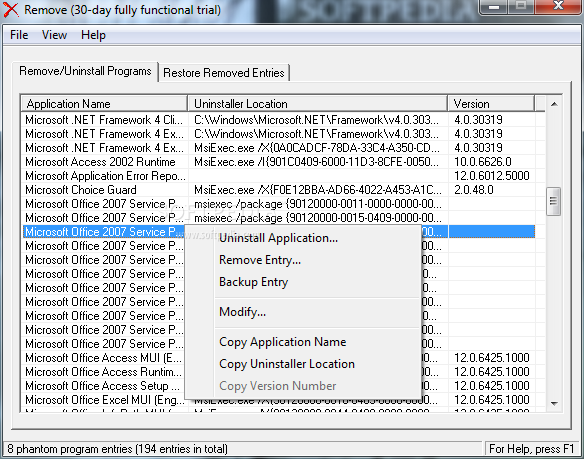
Remove is a program that can uninstall applications from your computer and get rid of their entries.
This is a portable software, so installing Remove is not necessary. You can simply store the tool on a removable drive and directly run its executable file on any computer. More importantly, your Windows registry keys will not be changed.
The interface of the application is very plain and simple to work with. Remove clearly needs a makeover from this point of view, since the interface is outdated.
You can check out a list of installed applications that is automatically displayed upon initialization. You can view their name, uninstall location and version.
Besides the fact that you can uninstall programs and remove their entries, you can also back up or modify an entry, as well as copy the application name, uninstall location or version number. You can restore entries that you have previously removed from the system and backed up, as well as refresh the list.
The program runs on a very low amount of system resources and includes a comprehensive “Readme” file. Remove did not freeze, crash or pop up errors during our tests.
On the other hand, there is no search function available. Plus, Remove failed to create backups for program entries on numerous occasions. We suggest you look for a more powerful similar software app at the moment.
What's new in Remove 4.1:
- fixed a minor bug which prevented from highlighting some of the phantom program entries in red
- updated the copyright information
- updated the author contact information and menu commands
- modified the documentation and updated the system requirements
Remove 4.1
add to watchlist add to download basket send us an update REPORT- runs on:
- Windows All
- file size:
- 55 KB
- filename:
- remove41.zip
- main category:
- Tweak
- developer:
- visit homepage
Bitdefender Antivirus Free

calibre

Microsoft Teams

Context Menu Manager

ShareX

IrfanView

4k Video Downloader

Zoom Client

Windows Sandbox Launcher

7-Zip

- Zoom Client
- Windows Sandbox Launcher
- 7-Zip
- Bitdefender Antivirus Free
- calibre
- Microsoft Teams
- Context Menu Manager
- ShareX
- IrfanView
- 4k Video Downloader