
Find and remove temporary, cache, history and backup files on all your local drives with System Cleanup. #System Cleanup #History cleaner #Cookies remover #Cleanup #Remove #Cleaner

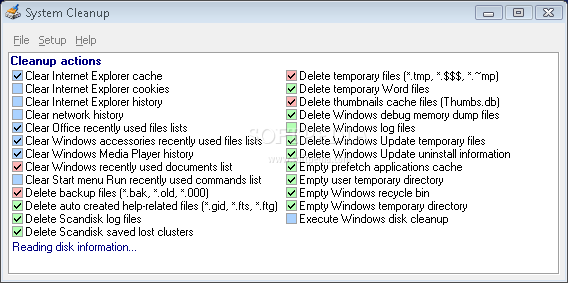
System Cleanup is an application that can help you get rid of unnecessary files from your hard drive, thus freeing up space.
This is a portable product, so installing System Cleanup is not necessary. You can place it on an external device and run it on any computer. Also, your Windows registry entries will remain unchanged.
Once you initialize the program with the minimalistic interface, System Cleanup automatically starts to read disk information. When it finishes, you can check out the current free space.
You can clean the Internet Explorer and Mozilla Firefox cache, cookies and history, network history, recently used file lists in MS Office and RealOne Player history.
But you can also clear Windows Media player history and recently used file lists in Accessories, WinRar history, as well as delete backup files and automatically created help-related files.
You can remove Scandisk log files and saved lost clusters, temporary Word and thumbnails cache files, Windows Update uninstall information, clear prefetch applications cache, user temporary directory, Outlook Secure Temporary File folder, Recyle Bin and Windows temporary directory, execute a Windows disk cleanup, and more.
All you have to do is check your preferred options and press the "Cleanup" button. When the task is completed, you can view how much space has been freed. You can read disk information again, exclude directories from the cleanup process, set up Windows disk cleanup, as well as select the level of protection for recent file access (disabled, Windows session, last week, smart) and scan mode (local drives only, include network drives).
The small software barely uses system resources and its help file consists of a legend (e.g. no files found to cleanup, registry cleanup or system function). We haven't come across any errors during our tests.
Additional options such as cleaning the cache, cookies and history in other web browsers or the deleting invalid Windows registry entries would have been welcomed. Even so, we strongly recommend System Cleanup to all users.
What's new in System Cleanup 1.7.501:
- Support for Network Drives
System Cleanup 1.7.501
add to watchlist add to download basket send us an update REPORT- runs on:
- Windows All
- file size:
- 539 KB
- filename:
- systemcleanup.zip

- main category:
- Security
- developer:
- visit homepage
Microsoft Teams

Windows Sandbox Launcher

calibre

Bitdefender Antivirus Free

Zoom Client

ShareX

7-Zip

4k Video Downloader

paint.net

IrfanView

- 4k Video Downloader
- paint.net
- IrfanView
- Microsoft Teams
- Windows Sandbox Launcher
- calibre
- Bitdefender Antivirus Free
- Zoom Client
- ShareX
- 7-Zip