
Recovers product keys for Microsoft Office 2003, 2007, 2010 and 2013, enabling you to backup the retrieved data to your computer for later use. #Office serial key #Recover product key #Office product key #Product key #Recovery #Serial key

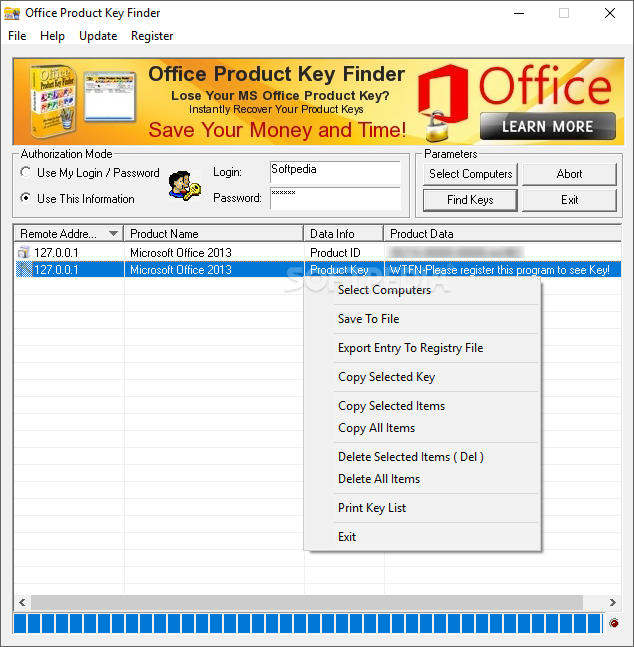
Office Product Key Finder is designed to give you a helping hand in situations when you want to recover lost or forgotten product keys for installed Microsoft Office packages. The serial key is required when trying to reinstall an Office product on a computer and without it, the setup process cannot be successfully finalized.
One important advantage that Office Product Key Finder brings you is the possibility to scan not just the local system, but also other workstations in your network in order to retrieve Office product keys. The only condition is that you have enough rights and the appropriate credentials that grant you access to remote hosts.
The application is compatible with multiple versions of the Office suite, namely 2003, 2007, 2010 and 2013. The ‘strategy’ that Office Product Key Finder adopts in order to retrieve the serial number is quite simple: it scans the system registry of each machine, trying to detect 25-character strings that could represent a possible match. The retrieved keys can be exported to various formats (REG, TXT, CSV, XLS etc.) or copied to the clipboard.
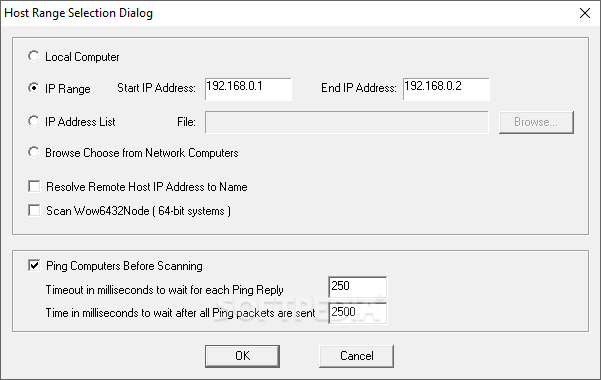
The scanning process for your local PC is done by simply pressing a button. On the other hand, if you want to analyze a remote system, a little bit more work has to be done. You must set the authorization mode (administrator rights are required) and configure the computers to scan. Users can choose a particular IP range or load a text file that contains a list of all the workstations.
Please note that there are certain requirements that must be fulfilled before the network auditing operation works. Users require registry access rights and full administrative privileges, while the ‘Remote Registry’ service and the ‘Client for Microsoft Networks’ option should be enabled on the target host. Also, the firewall needs to be configured in order to allow your access.
Office Product Key Finder focuses on functionality, rather than looks and therefore, its interface is quite simple and blunt. However, it manages to get the job done, enabling you to backup previously lost CD keys for Microsoft Office distributions installed on local or remote computers.
Office Product Key Finder 1.5.6.0
add to watchlist add to download basket send us an update REPORT- runs on:
-
Windows 10 32/64 bit
Windows 8 32/64 bit
Windows 7 32/64 bit
Windows Vista
Windows XP
Windows 2K - file size:
- 2.6 MB
- filename:
- officeproductkeyfinder_setup.exe
- main category:
- System
- developer:
- visit homepage
Bitdefender Antivirus Free

7-Zip

Windows Sandbox Launcher

ShareX

calibre

Microsoft Teams

IrfanView

Zoom Client

Context Menu Manager

4k Video Downloader

- Zoom Client
- Context Menu Manager
- 4k Video Downloader
- Bitdefender Antivirus Free
- 7-Zip
- Windows Sandbox Launcher
- ShareX
- calibre
- Microsoft Teams
- IrfanView