
With this lightweight and very easy to handle application, you have the ability to remove the advertisement windows from Avira Antivir. #Remove Avira Ad #Remove advertisement #Avira advertisement remover #Advertisement #Avira #Notifier
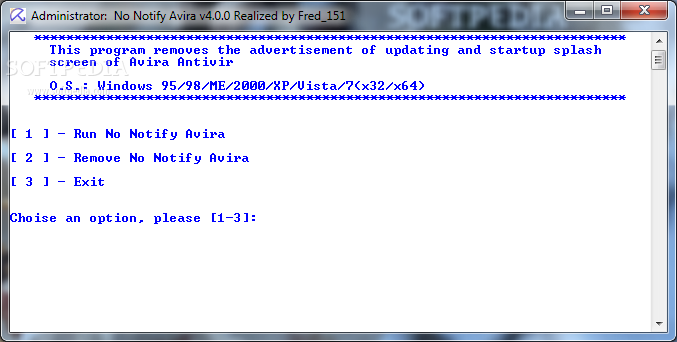
NoNotifyAvira is a handy and very easy to use piece of software which aims to offer you the means of getting rid of the splash screen and the update notification from Avira AntiVir, so they can no longer annoy you.
The tool is designed for Enterprise, Professional and Ultimate versions of the antivirus, so if you are using others, unfortunately NoNotifyAvira will not be able to help you.
For starters, you will need to disable Avira AntiVir Guard, otherwise the application is not able to work properly. The executable needs to be launched using your administrator privileges.
NoNotifyAvira features an exceedingly simple interface, featuring a white screen in which it lists the available functions and the corresponding command.
The program does not offer any additional functions or components to help you customize the process in any way, meaning that all you can do is enter the proper number and hit 'Enter'.
Subsequent to launching NoNotifyAvira, you will be able to input the command you want to work with, ‘1’ for ‘Run’, ‘2’ for ‘Remove’ and ‘3’ for ‘Exit’, depending on your current preferences.
After pressing the appropriate key, you can hit ‘Enter’ and following a brief moment during which the tool makes the necessary adjustments, you will be informed of the success of the operation. At the same time, the opposite command, which will revert the changes and bring back the update and splash screens, can be run just by pressing the ‘2’ key.
To summarize, NoNotifyAvira is a useful albeit basic utility which allows you to remove update and splash screens from Avira Antivir’s Enterprise, Professional and Ultimate editions, sparing you from their annoying occurrence.
What's new in NoNotifyAvira 4.0.1:
- Bug#01: on 32 bit it add 64 policy, now ok
NoNotifyAvira 4.0.1
add to watchlist add to download basket send us an update REPORT- runs on:
- Windows All
- file size:
- 24 KB
- filename:
- NoNotifyAvira-v4.0.1.zip
- main category:
- Security
- developer:
- visit homepage
calibre

Zoom Client

Windows Sandbox Launcher

IrfanView

Bitdefender Antivirus Free

ShareX

Microsoft Teams

Context Menu Manager

4k Video Downloader

7-Zip

- Context Menu Manager
- 4k Video Downloader
- 7-Zip
- calibre
- Zoom Client
- Windows Sandbox Launcher
- IrfanView
- Bitdefender Antivirus Free
- ShareX
- Microsoft Teams
