
Create a local backup of your non-Microsoft drivers so that they can be restored later, useful when you're planning to reinstall Windows. #Windows box #Driver Backup #System recovery #Driver #Box #Backup

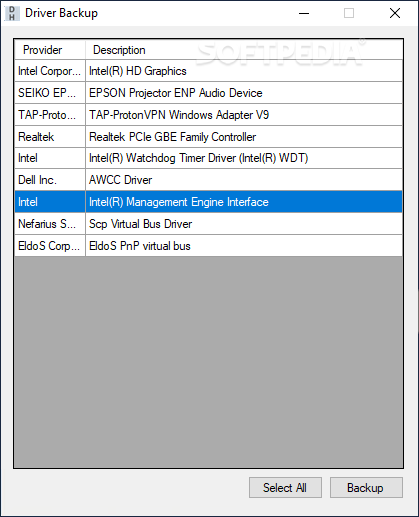
Driver Backup is a tiny but practical piece of software with a name that sums up its purpose - it lets you back up your drivers, in case you lose them, or immediately have to reinstall the operating system.
This is a portable app, so installing Driver Backup is not necessary. It means that you can store the tool on a USB flash drive or any other removable device, save it to any computer and directly run its executable file.
What's more important is the fact that the Windows Registry is not updated with new entries, and no leftover files can be found on the hard drive after program removal.
The interface of the application is based on a standard window with an uncomplicated layout. A list of all non-Windows drivers is automatically displayed upon program initialization.
All you have to do is select which drivers you want to create a copy of (or all of them), specify the output directory, and proceed with the backup procedure.
The simple-to-use software tool runs on a low-to-moderate amount of system resources, has a good response time and quickly finishes a task without freezing, crashing or popping up errors. We have not come across any issues during our evaluation. Driver Backup provides a straightforward solution to backing up non-Windows drivers. Thanks to its intuitive layout and overall simplicity, first-time users can easily learn how to work with this app.
Driver Backup 1.0.0.3
add to watchlist add to download basket send us an update REPORT- runs on:
-
Windows 10 32/64 bit
Windows 8 32/64 bit
Windows 7 32/64 bit
Windows Vista 32/64 bit
Windows XP 32/64 bit - file size:
- 37 KB
- filename:
- CSharp-DriverBackup.exe
- main category:
- System
- developer:
- visit homepage
Bitdefender Antivirus Free

IrfanView

Microsoft Teams

Windows Sandbox Launcher

calibre

ShareX

7-Zip

Context Menu Manager

Zoom Client

4k Video Downloader

- Context Menu Manager
- Zoom Client
- 4k Video Downloader
- Bitdefender Antivirus Free
- IrfanView
- Microsoft Teams
- Windows Sandbox Launcher
- calibre
- ShareX
- 7-Zip
