
User-friendly program addressed solely to those who run Windows 2000 or Windows XP whose purpose is to help them create and restore images of FAT32 and NTFS partitions. #Hdd image #Partition image #Clone hdd #Partition #Hdd #Image
Windows XP might have been superseded by several other operating systems, but there are still numerous users who run it on a daily basis.
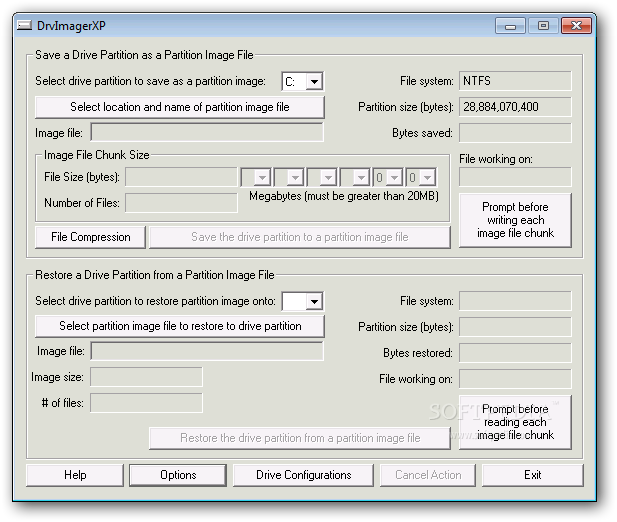
When they want to back up their drivers or partitions, they can rely on DrvImagerXP, a user-friendly utility that can be used to create and restore images of FAT32 and NTFS partitions.
Even though DrvImagerXP creates partition backups, it does not copy each file individually, it actually generates a mirror image after copying the sector bytes on the partition.
The advantage of this application is that users can create images of different operating systems then restore the one they prefer.
In other words, if, at some point, someone wants to give Windows 2000 or XP a try, they can simply use a previously-created image and restore its contents on a certain partition. If the results are not satisfactory, one can just as easily restore another image that would bring back the initial OS.
On the other hand, DrvImagerXP can also be used as a security tool, since users can make backups for each of their drives, and restore them whenever their PC gets infected or can no longer be opened due to a faulty program.
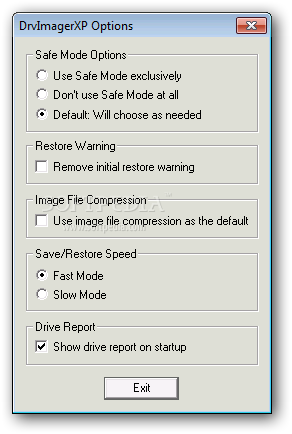
Experts can also compress the generated backup files, as well as choose the save and restore speed (either fast or slow) or specify whether DrvImagerXP should always use Safe Mode when making a backup.
Overall, DrvImagerXP comes with a nice set of features, but considering it is addressed solely to those who run Windows 2000 or Windows XP, it cannot be used by those who upgraded to a newer OS flavor.
Download Hubs
DrvImagerXP is part of these download collections: Partition Manager
DrvImagerXP 2.2
 Softpedia Editor's Pick
add to watchlist
add to download basket
send us an update
REPORT
Softpedia Editor's Pick
add to watchlist
add to download basket
send us an update
REPORT
- runs on:
-
Windows XP
Windows 2K - file size:
- 641 KB
- filename:
- DrvImagerXPSetup_2.2.exe
- main category:
- System
- developer:
calibre

Bitdefender Antivirus Free

ShareX

4k Video Downloader

IrfanView

Microsoft Teams

Zoom Client

Context Menu Manager

Windows Sandbox Launcher

7-Zip

- Context Menu Manager
- Windows Sandbox Launcher
- 7-Zip
- calibre
- Bitdefender Antivirus Free
- ShareX
- 4k Video Downloader
- IrfanView
- Microsoft Teams
- Zoom Client
