
A compact and powerful application that helps you easily recover data and various files from a broken NTFS-formatted Windows RAID. #Data recovery #Restore RAID #Recover file #RAID #Recovery #Recover

RAID is a data storage technology that creates a logical unit drive which combines multiple disk drive components. This virtual storage can be accessed by the operating system as a single drive, although it is composed of several disks. Recovering a broken or formatted RAID is a hard and risky task. You cannot always recover each file, and some may be corrupted or incomplete.
RAID Recovery for Windows provides you with a reliable software solution for restoring lost data from a NTFS-formatted Windows RAID.
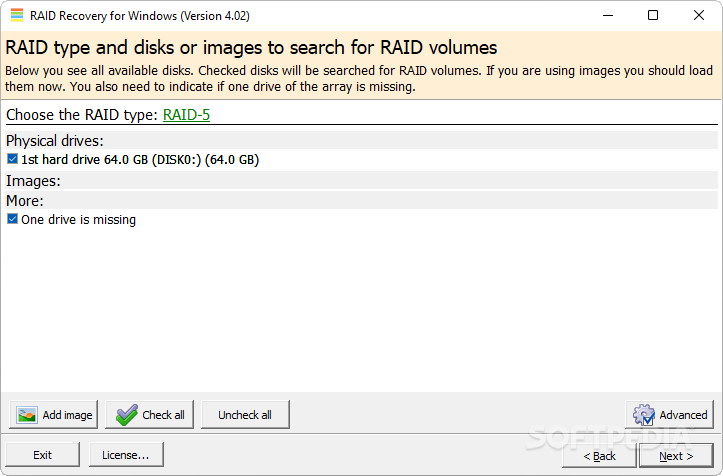
The application allows you to scan your drives for any files that have been lost during the formatting of a RAID. The program can scan various levels of RAID schemes, ranging from RAID-0 to RAID-5.
RAID Recovery for Windows can scan hardware RAIDS managed by the motherboard or controller card, as well as software RAIDS, managed by your operating system.
After the scan is complete, a window will display all the recoverable files and documents found. You can easily preview most of them, such as images or videos, as the built-in file viewer supports almost any type of file.
You can use the search function to find a specific file or document, as long as that file is recoverable.
RAID Recovery for Windows displays every action it takes in order to find lost files on formatted or broken RAIDs.
This is very useful, because you can see exactly the amount of memory used, as well as the file distribution throughout your drives.
RAID Recovery for Windows helps you easily reacquire your lost files from a formatted or malfunctioning RAID unit. All you have to do is to select the drives you want to be scanned, then let the program do the rest.
RAID Recovery for Windows 4.02
add to watchlist add to download basket send us an update REPORT- runs on:
- Windows All
- file size:
- 2 MB
- filename:
- winraid.zip
- main category:
- System
- developer:
- visit homepage
calibre

Bitdefender Antivirus Free

7-Zip

Zoom Client

ShareX

4k Video Downloader

Microsoft Teams

Context Menu Manager

IrfanView

Windows Sandbox Launcher

- Context Menu Manager
- IrfanView
- Windows Sandbox Launcher
- calibre
- Bitdefender Antivirus Free
- 7-Zip
- Zoom Client
- ShareX
- 4k Video Downloader
- Microsoft Teams
