
You can extract all the RAR files from a folder and delete the archives after the process is done or you can only verify the archives. #RAR Extactor #Extract ZIP #Archive Extraction #Extract #Extractor #Recover

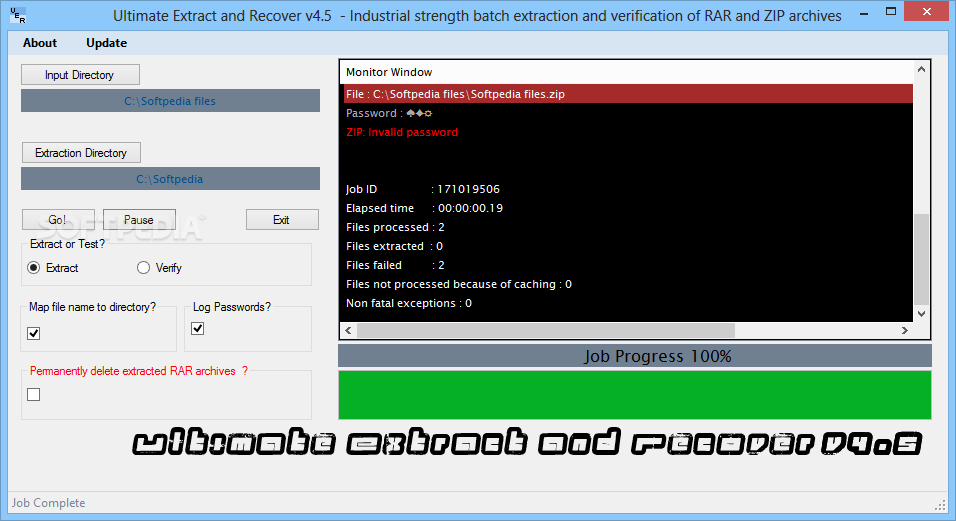
If you wish to extract files from multiple RAR archives at the same time you should have a look at Ultimate Extract and Recover. It can also deal with password-protected archives.
Although you may find the interface a bit unprofessional, it does a great job helping the app complete the task of decompressing the user-defined archives. Even though a more user-friendly and modern approach is always welcomed, the application focuses on functionality rather than on appearance.
You thus have to pick the input and the output directory and configure settings to remember input and output folders, delete the extracted RAR files, map directory to archive name, as well as enable test mode or log password.
Ultimate Extract and Recover doesn't assault the user with too many configuration settings, so it takes just a minute before jumping to the main process of extracting files.
Besides the main window, Ultimate Extract and Recover also shows a Command Prompt window that displays a bunch of statistics, including the total number of processed files, successfully extracted, tested or failed.
Ultimate Extract and Recover can very well be used as a password recovery tool if you provide a comprehensive dictionary file. The application tries each password for a user-defined list of archives, but this may take some time.
Unrar Extract and Recover works runs on low resources, but it may stress up the CPU and RAM a little bit when processing larger archives.
But overall, this is quite a handy tool if you deal with multiple archives at the same time on a regular basis and a simple visual 'facelift' would turn it into a top product.
What's new in Ultimate Extract and Recover 6.0:
- Fixed bug where some files were rejecting/not checking certain passwords.
- Users of older versions are strongly suggested to upgrade to this version (version
- dded German translation to GUI
- Visual improvements
Ultimate Extract and Recover 6.0
add to watchlist add to download basket send us an update REPORT- runs on:
-
Windows 10 32/64 bit
Windows 8 32/64 bit
Windows 7 32/64 bit
Windows Vista 32/64 bit
Windows XP 32/64 bit - file size:
- 1.6 MB
- filename:
- UltimateExtractAndRecover_Setup.exe
- main category:
- System
- developer:
Zoom Client

Context Menu Manager

Microsoft Teams

Windows Sandbox Launcher

calibre

7-Zip

Bitdefender Antivirus Free

IrfanView

ShareX

4k Video Downloader

- IrfanView
- ShareX
- 4k Video Downloader
- Zoom Client
- Context Menu Manager
- Microsoft Teams
- Windows Sandbox Launcher
- calibre
- 7-Zip
- Bitdefender Antivirus Free