
Get an idea whether or not your CPU can deal with application that push it to the limits with the help of this practical and easy to use tool. #Test tool #CPU info #Overclock tool #Test #CPU #Tool

Overclocking can turn the computer into a faster, more powerful machine if it is done properly but it might, just as well, damage the system when inappropriate parameters are used. For those who want to squeeze even the latest performance drop from their machines, a stress tool like CPU Burn-in will give a pertinent evaluation concerning the limits of their processor, one of the most overclocked components.
A software solution specifically designed to put the CPU up to test, this tool relies on simplicity from one end to the other and seems to be the easiest way to discover the way one should get along with the hardware.
CPU Burn-in doesn't require installation, the application being delivered as a stand-alone executable that only needs a double-clicked to load and run. This makes it possible to store it on a removable storage device and use it on any machine you want to test.
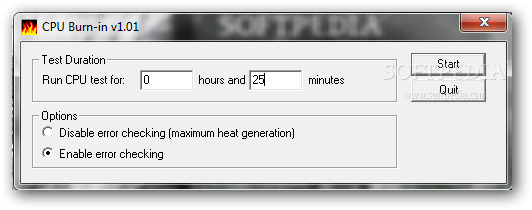
The interface is minimal. The user only has to enter the test duration in hours and minutes to have the CPU running in full load. Other than that, there are two more options that regard enabling or disabling error checking during the test.
Of course, since it's supposed to get on your CPU's nerves, CPU Burn-in can't be called a pretty computer friendly application when talking about hardware resources, but it can be loaded on practically any Windows machine out there.
CPU Burn-in is a very good tool to take for a spin if you want to try your hand at overclocking because it will help you get an idea about the upper limits of your processor's capabilities. It runs on any configuration and Windows version, thus becoming available to a large public.
CPU Burn-in 1.01
 Softpedia Editor's Pick
add to watchlist
add to download basket
send us an update
REPORT
Softpedia Editor's Pick
add to watchlist
add to download basket
send us an update
REPORT
- runs on:
- Windows All
- file size:
- 7 KB
- filename:
- CPU_burn-in.zip
- main category:
- System
- developer:
- visit homepage
IrfanView

calibre

paint.net

4k Video Downloader

Windows Sandbox Launcher

Bitdefender Antivirus Free

Zoom Client

Microsoft Teams

7-Zip

ShareX

- Microsoft Teams
- 7-Zip
- ShareX
- IrfanView
- calibre
- paint.net
- 4k Video Downloader
- Windows Sandbox Launcher
- Bitdefender Antivirus Free
- Zoom Client