
Application for formatting and making bootable, USB Flash Memory Drives. #Bootable USB flash #Make bootable flash #Make UFD bootable #Bootable #UFD #USB flash
In the beginning, floppy boot diskettes provided the only pre-installation environment for old operating systems such as Win95, 98 or Millenium. Some users even used them to install the later Windows XP. Although this is the main purpose of such disks, many other operations can be performed – data recovery, system maintenance, virus scanning or system repairs.
The CD-ROM version of the floppy boot diskette has become available through the launch of Microsoft's WinPE, the stripped down version of Windows XP. It offers the exact toolbox for users that want to operate a PC without a hard drive or to perform various tasks in the provided pre-installation environment. It uses the RAM of the computer to load itself up and it really works fast.
A BartPE is the customized version of WinPE, created with Bart Lagerwij's PE Builder. This can be done by extracting the required files from the Windows XP installation CD. BartPE's support for plugins makes it possible for you to add your own applications to the environment such as GetDataBack, DriveExplorer or Captain Nemo. It also provides network and Internet access, too.
PeToUSB is one of the many applications that can turn your USB drive into such a pre-installation environment device. Being one of the pioneers of this category, it built up its rep and reached top ranks on Softpedia. Its sole purpose is to transfer WinPE / BartPE files to your USB Removable or Fixed drive in order to make it bootable and recognizable by the majority of motherboards.
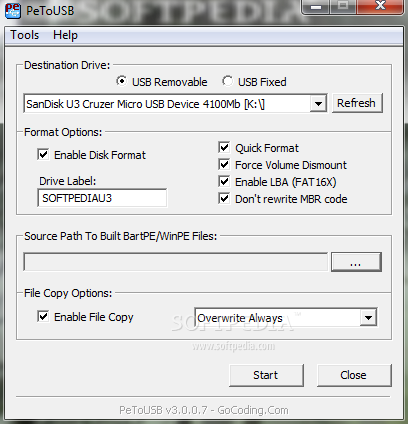
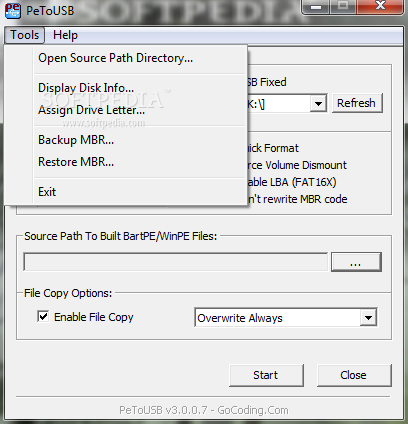
As expected, the program's interface does not stand out of the crowd while keeping things tidy and well-organized. Its main window provides four areas: Destination Drive selection at the top, Format Options (Drive Label, Quick Format, Force Volume Dismount, Enable LBA or Don't rewrite MBR Code) in the middle, `Source Path to Built BartPE/WinPE Files` and File Copy Options at the bottom. The Tools menu also come packing options like Backup / Restore MBR.
PeToUSB is the right application for the complex operation of turning your USB drive into a bootable device packed with a ready-to-go environment that you can use every time you find yourself into a problematic situation or you just want to perform specific tasks that ask for a fast-booting OS other than the one you have installed on your local disk. Bottomline is that it's high reliability and speed of execution are more than good enough to make it a top choice in its league.
Download Hubs
PeToUSB is part of these download collections: Create Bootable USB
What's new in PeToUSB 3.0.0.7:
- Fixed a bug where program crashed with a buffer overrun mesage at startup on some systems. This was happening when extended partitions on a disk made the partition count greater than 4.
PeToUSB 3.0.0.7
add to watchlist add to download basket send us an update REPORT- runs on:
- Windows All
- file size:
- 99 KB
- filename:
- PeToUSB_3.0.0.7.zip
- main category:
- System
- developer:
- visit homepage
calibre

4k Video Downloader

IrfanView

Context Menu Manager

Windows Sandbox Launcher

7-Zip

Zoom Client

Microsoft Teams

Bitdefender Antivirus Free

ShareX

- Microsoft Teams
- Bitdefender Antivirus Free
- ShareX
- calibre
- 4k Video Downloader
- IrfanView
- Context Menu Manager
- Windows Sandbox Launcher
- 7-Zip
- Zoom Client