
Freeware app that helps you create a bootable USB key with Ubuntu on it. #Bootable usb #Ubuntu live #Create bootable ubuntu #Ubuntu #Bootable #Boot

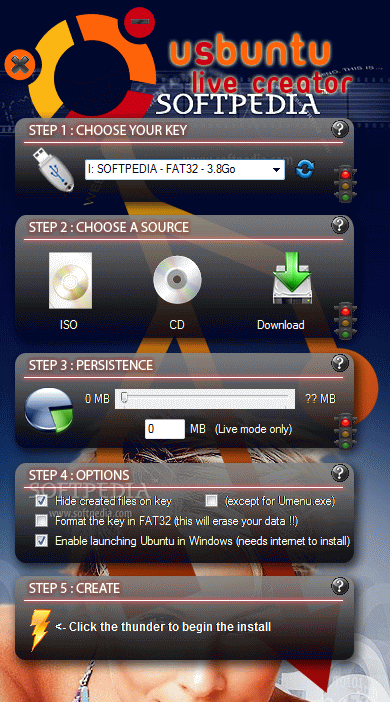
uSbuntu Live Creator is a very easy to use application that allows you to create a bootable USB stick with multiple Linux distributions, including Ubuntu, Xubuntu and Kubuntu.
With a very appealing interface, uSbuntu Live Creator is addressed to beginners and experienced users alike, providing a very straightforward process for creating a bootable device.
First, the user is required to select the USB device to be used and then pick a source, which can be an ISO or a CD. If you still don't have a source file, there's a dedicated “Download” button that gets you to the official Ubuntu webpage to download the necessary files.
The third step allows you to enable persistency of your data, while the next one comes with a few options, including a separate setting to hide created files on the removable device. If the USB Flash drive isn't already formatted in FAT32, you must check this option as well.
uSbuntu Live Creator works pretty fast, but the bootable USB stick creation time also depends on the speed of your removable drive as well.
The application works with Ubuntu 8.10 and 9.04, so older versions, such as 8.04 (Hardy Heron) or 7.10 (Gutsy Gibbon) are not compatible. It supports Kubuntu, Xubuntu, Mint and Crunchbang.
uSbuntu Live Creator should be able to work with 64-bit releases as well, but various error may appear during the process of creating the bootable media.
USbuntu Live Creator is one of the best ways to create a bootable USB Flash drives and since everything so straightforward, it can be safely used by those uninitiated and experienced users alike.
Download Hubs
uSbuntu Live Creator is part of these download collections: Create Bootable USB
What's new in uSbuntu Live Creator 1.5:
- Improvements :
- now supports Ubuntu 9.04, Linux Mint and CrunchBang
- creating a contextual menu to launch uSbuntu
- new language available : Italian
uSbuntu Live Creator 1.5.1
add to watchlist add to download basket send us an update REPORT- runs on:
-
Windows Vista
Windows XP - file size:
- 1.7 MB
- filename:
- uSbuntu Live Creator.zip
- main category:
- System
- developer:
- visit homepage
Context Menu Manager

Microsoft Teams

Bitdefender Antivirus Free

ShareX

calibre

4k Video Downloader

7-Zip

Windows Sandbox Launcher

Zoom Client

IrfanView

- Windows Sandbox Launcher
- Zoom Client
- IrfanView
- Context Menu Manager
- Microsoft Teams
- Bitdefender Antivirus Free
- ShareX
- calibre
- 4k Video Downloader
- 7-Zip