
This specialized application will help you find and delete all empty folders automatically, starting from a base folder of your choice. #Empty folder #Delete folder #Find folder #Empty #Folder #Delete

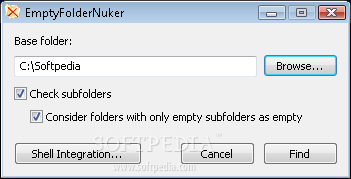
Empty Folder Nuker is a tiny application that allows you to easily delete empty folders that clutter the interface of your operating system.
This is a portable product, so installation is not necessary. All you have to do is place Empty Folder Nuker on a removable device and run the executable file on any computer. Plus, your Windows registry entries will not change in any way.
The interface of the program consists of a small window in which you have few options.
In order to get Empty Folder Nuker to work, you have to input the base folder, as well as optionally check subfolders and consider folders with only empty subfolders as empty.
In other words, if you, for example, input your main volume as the base folder, all the folders with empty contents (including empty subfolders) will be deleted from your system.
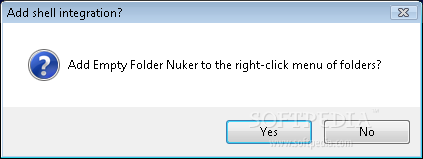
This way, you will have an easier time searching for a file in an unknown location on your hard drive (since you can disregard empty folders). You can add Empty Folder Nuker to the Explorer context menu, so accessing it it easily done.
The program uses a very low amount of system resources and performs a scanning task in a reasonable amount of time (according to the size of the base directory).
Once the scanning is complete, you can specify the empty folders you want to delete, optionally check all of them and enable the tool to exit after deletion has been successful. Removing the files takes a short while (they are not permanently deleted, but moved to the Recycle Bin).
Evidently, not all folders can be removed by Empty Folder Nuker, since some of them are system files which require administrator privileges. Otherwise, Empty Folder Nuker gets its job done, so we strongly recommend it to all users, whether they are experienced or not.
What's new in Empty Folder Nuker 1.3.0:
- Added ability to save empty folder paths to text file
- Fixed graphical glitch on buttons when resizing window
Empty Folder Nuker 1.3.0
add to watchlist add to download basket send us an update REPORT- PRICE: Free
- runs on:
- Windows 10 32/64 bit
- file size:
- 340 KB
- filename:
- EmptyFolderNuker.exe
- main category:
- System
- developer:
7-Zip

Bitdefender Antivirus Free

IrfanView

Zoom Client

Microsoft Teams

4k Video Downloader

Windows Sandbox Launcher

calibre

paint.net

ShareX

- calibre
- paint.net
- ShareX
- 7-Zip
- Bitdefender Antivirus Free
- IrfanView
- Zoom Client
- Microsoft Teams
- 4k Video Downloader
- Windows Sandbox Launcher