
Fill up your hard drive. #Create File #FIle Creator #File Sizer #Create #Creator #Sizer
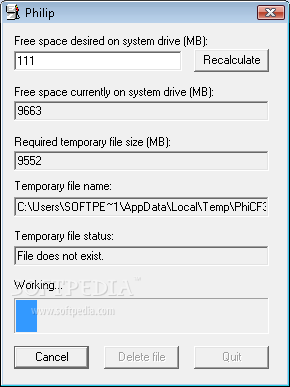
The Philip application was designed to be a small program that fills up your hard drive.
There are three reasons. - Philip was initially designed to work around a problem that sometimes occurs on computers that have very large hard drives. Some setup programs aren’t capable of calculating space requirements on hard drives that have a very large amount of free disk space available, because the numbers that the computer reports are so big that they exceed the setup program’s ability to properly interpret them. You can usually successfully install programs like this when the hard drive has less than 2 to 4 gigabytes (or 2048 to 4096 megabytes) free. You can use Philip to temporarily stuff your hard drive so that you can install that problematic piece of software and then reclaim the space when you’re done.
- Another way that Philip comes in handy is during the development of software. With Philip you can test how a program behaves when running on systems with very limited free disk space.
- If you’re concerned about data security, you should know that when you delete a file and empty your recycle bin in Windows, it’s not truly gone until the sectors where it was stored get overwritten with other data. If you’re preparing to get rid of a computer and you’re worried about future users of it (or your hard drive) being able to retrieve old personal files from it, you can use Philip to ensure that none of your personal data is left over on the drive. To do this, delete all your personal files and empty your recycle bin. Next, run Philip and tell it to leave 0MB free on your drive. Philip will create a giant file of nonsense information that will wipe out all traces of the old files. Finally, delete Philip’s temporary file and reformat your drive. Good as new!
- Speed. It can take a long time to copy 4096 MB of files to a hard drive- sometimes hours, depending on the source, number, and size of the files. Philip is optimized for speed and can usually do the trick in just a few minutes.
- Precision. Using the file-copy method makes it tough to achieve an exact amount of free disk space. In Philip, you just enter the number of megabytes you want free and it calculates exactly how large its temporary file needs to be.
- Simplicity. Instead of searching for files and looking for an appropriate place to put them, Philip creates a single file in your computer’s temp directory that you can append or delete with a single click.
What's new in Philip 2.10:
- Added notes about using other drives
Philip 2.10
add to watchlist add to download basket send us an update REPORT- runs on:
- Windows All
- file size:
- 66 KB
- filename:
- Philip.zip
- main category:
- System
- developer:
- visit homepage
Microsoft Teams

Bitdefender Antivirus Free

7-Zip

Context Menu Manager

Zoom Client

Windows Sandbox Launcher

calibre

4k Video Downloader

IrfanView

ShareX

- 4k Video Downloader
- IrfanView
- ShareX
- Microsoft Teams
- Bitdefender Antivirus Free
- 7-Zip
- Context Menu Manager
- Zoom Client
- Windows Sandbox Launcher
- calibre