
Lightweight, portable and easy-to-understand program designed to quickly identify file extensions based on their binary signatures. #File type #File information #Binary signature #Analyze #Signature #Type

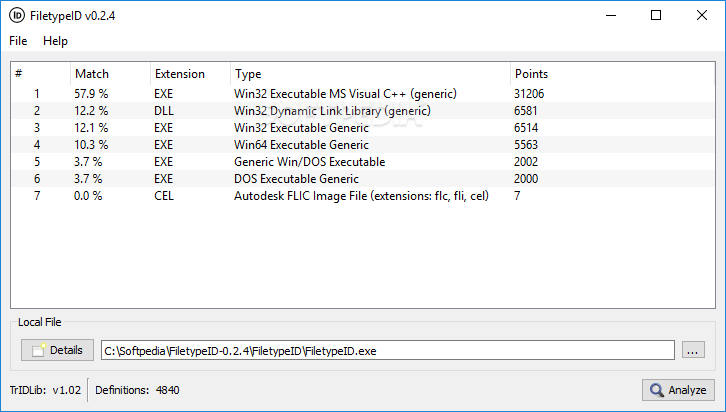
FiletypeID is a small-sized and portable software application that can detect unknown file formats according to their binary signature.
It does not comprise complicated options or configuration parameters, so it can be handled by all types of users, regardless of their level of experience.
Since installation is not a prerequisite, you can drop the executable file in a custom directory on the hard disk and just click it to run.
There is also the possibility of saving FiletypeID to a USB flash disk or similar storage unit, to be able to run it on any PC with minimum effort and no previous installers.
An important aspect to take into account is that the Windows registry does not get updated with new entries, and no extra files are created on the disk, thus leaving no traces after its removal.
The interface is made from a normal window with a very simplistic structure, where you can point out files with unknown types by dropping them in the list.
File details include the file name, extension, size, SHA-1 checksum, date of creation and last modification, along with metadata (if any). This information can be copied to the Clipboard with one click.
File analysis is immediately performed, and results show the file extensions, types and matches (in percent), along with points. These details can be saved to HTML format for closer inspection. You can check for updates regarding file format definitions.
The app does not put a strain on computer performance, since it uses low CPU and RAM. It generally delivers good results, as far as our testing is concerned. No error dialogs were revealed to us, and the tool did not hang or crash.
FiletypeID is a pretty handy program when it comes to detecting unknown file types, and it can be easily used by anyone.
What's new in FiletypeID 0.2.4:
- Improved code
- Added definitions update support
FiletypeID 0.2.4
add to watchlist add to download basket send us an update REPORT- runs on:
-
Windows 10 32/64 bit
Windows 8 32/64 bit
Windows 7 32/64 bit
Windows Vista
Windows XP - file size:
- 9.6 MB
- filename:
- FiletypeID-0.2.4.zip
- main category:
- System
- developer:
7-Zip

Zoom Client

Windows Sandbox Launcher

ShareX

Context Menu Manager

calibre

4k Video Downloader

IrfanView

Microsoft Teams

Bitdefender Antivirus Free

- IrfanView
- Microsoft Teams
- Bitdefender Antivirus Free
- 7-Zip
- Zoom Client
- Windows Sandbox Launcher
- ShareX
- Context Menu Manager
- calibre
- 4k Video Downloader