
A useful tool that fixes disk problems, recovers hidden files and performs various other tweaks. #Recover file #Restore file #Restore condition #Recover #Restore #Hdd

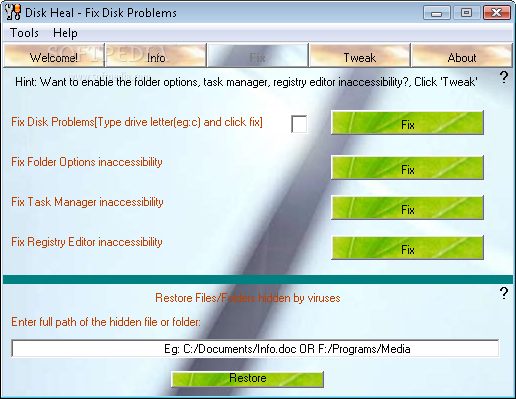
Whether you need to fix some issues with your operating system or you just want to tweak Windows to squeeze even the last performance drop out of it, Disk Heal is a software solution that could come in very handy.
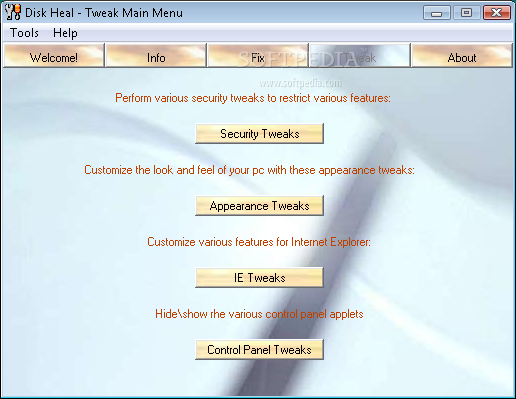
This application is designed to help you fix disk problems, but it also gives you the possibility to change some Windows settings, be they intended to boost security, tweak the appearance, customize Internet Explorer or hide and show some Control Panel applets.
Disk Heal's interface isn't that attractive, yet it serves its purpose very well because all the features are organized in tabs.
The application can help you a lot when trying to fix the problems caused by viruses or other malicious files, so for example you can fix Task Manager and Registry Editor in case they refuse to load. Plus, you can solve disk problems and restore C: as your system drive.
The tweaking chapter is a bit more complex and allows you to play with many of settings. For instance, if you wish to boost your computer's security you can disable folder options, Task Manager, Registry Editor or even right-click menu plus a lot of other options.
The appearance tweaks include ClearType fonts and smooth scrolling, but there are some that give you the possibility to show the Windows version on desktop or remove the left panel in My Computer.
Disk Heal is a nice application to help you address disk issues. The feature pack that comprises many Windows tweaking tools is also of great aid and thanks to its easy to understand interface, the program is well suited for all users.
Download Hubs
Disk Heal is part of these download collections: HDD Managers
What's new in Disk Heal 1.48:
- Vista compatibility is limited to a few features.
Disk Heal 1.48
add to watchlist add to download basket send us an update REPORT- PRICE: Free
- runs on:
- Windows All
- file size:
- 421 KB
- filename:
- DiskHealSetupv1.48R.exe
- main category:
- System
- developer:
- visit homepage
7-Zip

IrfanView

ShareX

Windows Sandbox Launcher

Microsoft Teams

4k Video Downloader

Zoom Client

calibre

paint.net

Bitdefender Antivirus Free

- calibre
- paint.net
- Bitdefender Antivirus Free
- 7-Zip
- IrfanView
- ShareX
- Windows Sandbox Launcher
- Microsoft Teams
- 4k Video Downloader
- Zoom Client