
Easily get your hard disk drive formatted in the FAT32 system with the help of this lightweight but powerful software application. #Format Fat32 #Format Partition #Hard Disk Formatter #Format #Formatter #Fat32
Disk formatting is the operation that prepares hard disks or other devices (like USB flash drives or Solid State Disks) for data storage purposes. Usually, this process also creates a file system that organizes the data on the disk surface. Most common Windows file systems are the FAT (File Allocation Table) and the NTFS (New Technology File System).
The File Allocation Table file system was first introduced as FAT12 back in 1980, soon followed by FAT16 in 1984 and later, by FAT32 in 1996. FAT32's release overcame the 2 GB size limit of FAT16 by increasing the cluster size and setting it to 4 GB. As for operating systems, Windows XP is the last of them to support the FAT32 file system.
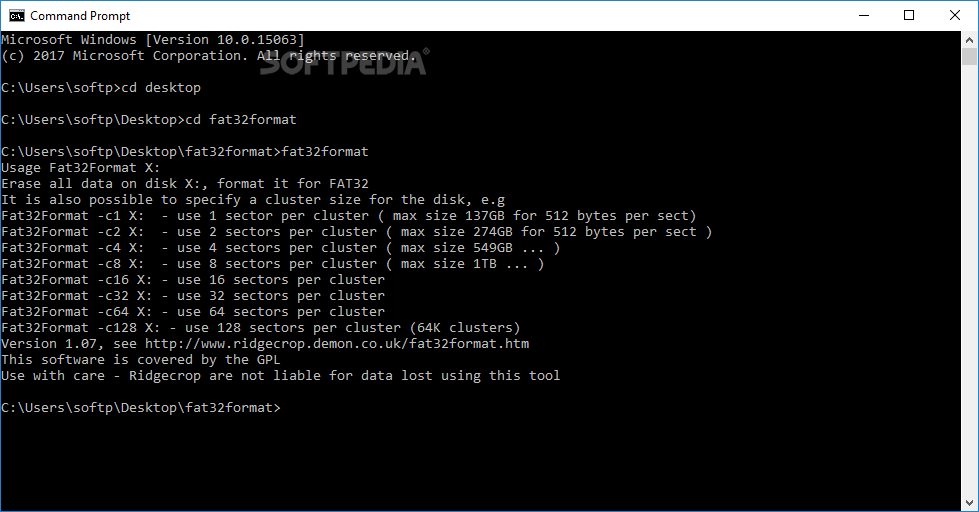
FAT32format provides a powerful yet easy-to-use command-line utility that helps you format your hard disks in the FAT32 file system. It also comes with a few cluster size related options that make it possible to format large disks. There is also a GUI version of this program - FAT32format GUI (GUIFormat)
By default, FAT32format has no problems formatting partitions as large as 137 GB. In order to perform formatting on more vast partitions, you may use the '-cN' parameter and set the number of sectors one cluster holds. It starts with 1 and goes all the way up to 128 sectors per cluster, thus being able to format a maximum size of 1 TB.
While unleashing great potential of the FAT32 file system, the side effects are a bit extreme. Increasing the number of sectors per cluster results in prolonged disk checking due to extensive FAT reads done by the 'chkdsk' utility.
FAT32format is all about disk formatting and setting of the cluster size. It keeps it simple and its one and only goal is preparing your disk to receive files while creating the FAT32 file system to manage oncoming data. It is not intended for anything else and if you're not bothered by the 4 GB file size limitation, this is the right tool to format drives of all sizes.
Download Hubs
FAT32format is part of these download collections: HDD Managers
What's new in FAT32format 1.07:
- GPT support, fix for boot sector when using Windows AIK's bootsect.exe, FSCTL_ALLOW_EXTENDED_DASD_IO
FAT32format 1.07
add to watchlist add to download basket send us an update REPORT- PRICE: Free
- runs on:
- Windows All
- file size:
- 83 KB
- filename:
- Guiformat_X86_X64.zip
- main category:
- System
- developer:
4k Video Downloader

Windows Sandbox Launcher

7-Zip

Context Menu Manager

Zoom Client

IrfanView

Microsoft Teams

calibre

Bitdefender Antivirus Free

ShareX

- calibre
- Bitdefender Antivirus Free
- ShareX
- 4k Video Downloader
- Windows Sandbox Launcher
- 7-Zip
- Context Menu Manager
- Zoom Client
- IrfanView
- Microsoft Teams