
Easily format disk drives larger than 32 GB to FAT32 file system in the blink of an eye with the help of this lightweight application. #Format partition #FAT32 format #Format drive #Format #FAT32 #Partion

By default, your operating system comes equipped with a handful of disk management tools. However, other application tend to provide both enhanced ease of access and advanced features. Fat32Formatter is one of them, being designed to allow you to format drives larger than 32 GB using the FAT32 file format.
Although it's supposed to do such an important job, that of formatting disc drives, the application doesn't also include a help file to guide users and make sure they're on the safe side at all times.
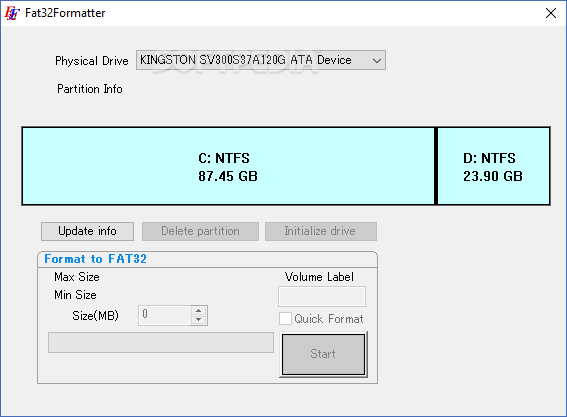
Instead, the program offers an intuitive interface that makes everything pretty easy to use, both for beginners and more experienced computer users. It allows you to select the physical drive you wish to format, showing a simple graph with the available partitions and their total size.
There are three options available in the main window, namely “Update Info”, “Delete partition” and “Initialize drive”, each with pretty self-intuitive names.
As for the formatting process, Fat32Formatter provides you with the option to input the volume label, but also to pick the size and to choose whether to perform a quick format or not. The rest of the job is completed once you press the “Start” button and Fat32Formatter takes care of everything else.
Fat32Formatter worked flawlessly during our tests and although it needs a moderate amount of resources, it's recommended to avoid using the computer while the application performs a disk format. Other than that, it's pretty clear that it remains a handy software solution, even if it's obvious that it still needs some improvements in multiple key areas.
Taking everything into consideration, we can say that Fat32Formetter is a handy application that gets the job done well. It may not be the best of its kind, bringing nothing new on the block, but it lets you quickly accommodate with its features which makes it worth at least a try.
What's new in Fat32Formatter 1.1:
- Windows 7 supported, improved UI
Fat32Formatter 1.1
add to watchlist add to download basket send us an update REPORT- runs on:
-
Windows 10 32/64 bit
Windows 8
Windows 7
Windows Vista
Windows XP
Windows 2K - file size:
- 183 KB
- filename:
- Fat32FormatterEN.zip
- main category:
- System
- developer:
4k Video Downloader

IrfanView

calibre

7-Zip

Bitdefender Antivirus Free

Microsoft Teams

ShareX

paint.net

Windows Sandbox Launcher

Zoom Client

- paint.net
- Windows Sandbox Launcher
- Zoom Client
- 4k Video Downloader
- IrfanView
- calibre
- 7-Zip
- Bitdefender Antivirus Free
- Microsoft Teams
- ShareX