Softpedia
 

WINDOWS CATEGORIES:


GLOBAL PAGES >>
SOFTPEDIA REVIEWS >>
MEET THE EDITORS >>

WEEK'S BEST

  • DAEMON Tools Pro (...
  • FlashFXP [ DISCOUN...
  • PowerISO 4.9
  • WebcamMax [DISCOUN...
  • Zemana AntiLogger ...
  • System Mechanic Pr...
  • Glary Utilities Pr...
  • All My Movies [DIS...
  • Ad-Aware Internet ...
  • Atlantis Word Proc...
  • Home > Windows > System > Hard Disk Utils
     Report malware

    HDD Scan 3.3

    download button

    Part of the HDD Managers download hub
    Downloads: 65,126  View global page  Tell us about an update
    User Rating:
    Rated by:
    Very Good (4.4/5)
    164 user(s)
    Developer:

    License / Price:

    Size / OS:

    Last Updated:

    Category:

    Freeware / $0
    3.6 MB / Windows 2K / XP / 2003 / Vista / 7 / 7 x64
    [view history]
    C: \ System \ Hard Disk Utils

     Read user reviews (4)  Send to friend   Follow (9 users)

    EDITOR'S RATING

    Softpedia Editor's Review for HDD Scan

    A useful tool for testing your hard drive

    Written by Elena Opris on December 19th, 2011

    HDD Scan is a very practical tool that lets you test your hard drive, as well as analyze statistical reports.

    Since the application doesn't need to be installed, your Windows registry keys remain intact. You can also place HDD Scan on an external device and directly run it on any computer.

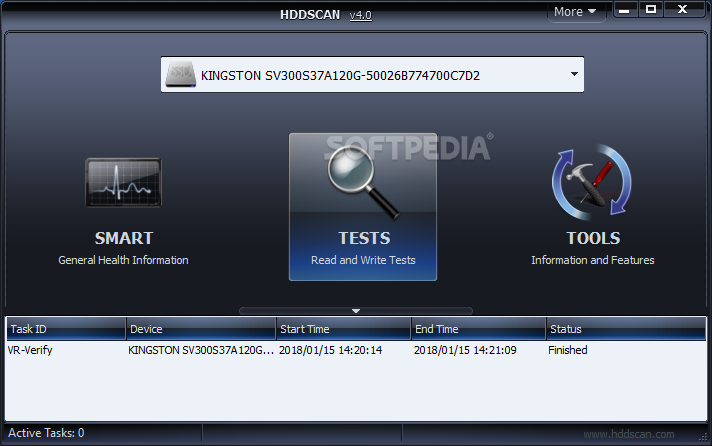
    The user interface is simple and eye-catching. Once you have selected a drive, you can start performing various tests and view their results in the Test Manager below.

    For instance, you can get a S.M.A.R.T. report (e.g. "Raw Read Error Rate", "Seek Error Rate", "Power-On Hours Count", "Airflow Temperature").

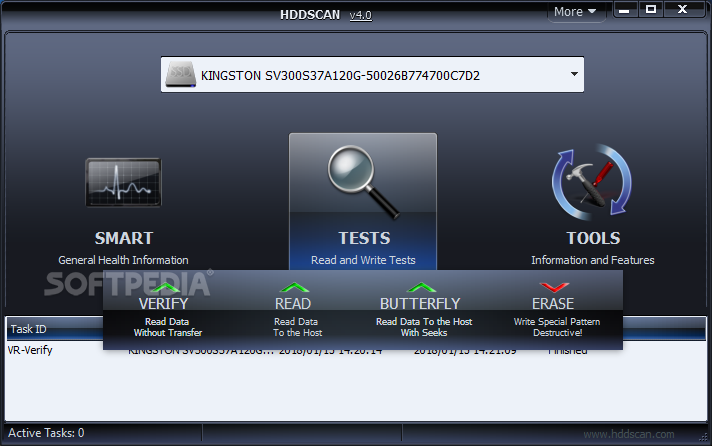
    But you can also perform surface tests in which you view the model, firmware and serial of your drive, and input "Start LBA", "End LBA" and "Block Size" to verify, read, erase or butterfly-read it.

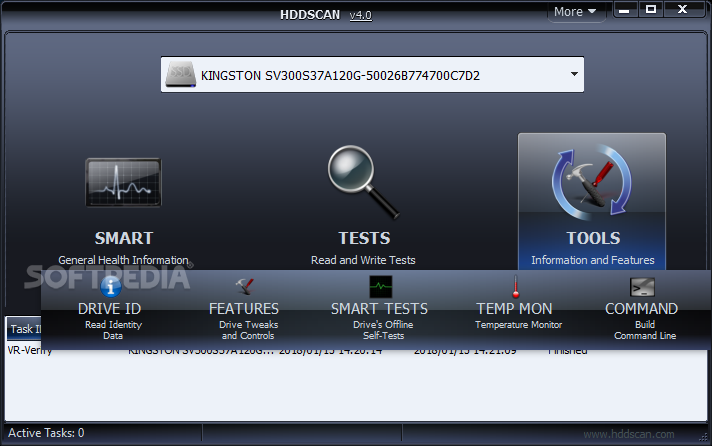
    Furthermore, you can perform a S.M.A.R.T. offline test (short, extended or conveyance test), take the monitor's temperature, use IDE and SCSI features, get a drive identity report (e.g. cache size, RPM, power management, password protection), as well as build a command line and change the interface's appearance.

    Results can be printed or saved to file (HTML, HTM, MHT, TXT). The program uses a moderate amount of system resources (except in the case of a S.M.A.R.T. offline test when CPU usage significantly rises), comes with an online help file (that can be accessed from the "About" window) and didn't freeze or crash during our tests.

    Since this tool presents technical information about hard drives and a risk of erasing files, we mainly recommend HDD Scan to power users.


    Read an in-depth analysis in our professional review for HDD Scan

    HDD Scan description

    Here are some key features of "HDD Scan":

    Supported storage devices:
    · IDE (ATA) and SATA HDD.
    · SCSI (SAS) HDD.
    · External USB drives and all major USB boxes (see Appendix A).
    · FireWire or IEEE 1394 HDD (see Appendix A).
    · RAID volumes made of ATA (IDE) / SATA / SCSI HDDs (surface tests only).
    · USB Flash (pen drives) – surface tests only.
    · SATA / ATA SSD – solid state drives (NEW).

    Storage device tests:
    · Verification in linear mode – helps to determine if your drive needs data rescue, has recoverable errors or in its perfect shape.
    · Reading in linear mode – simpler, but faster disk check.
    · Erasing in linear mode.
    · Reading in Butterfly mode (synthetic random read).

    S.M.A.R.T.:
    · Reading and analyzing SMART parameters from ATA/SATA/USB/FireWire HDD.
    · Reading and analyzing Log Pages from SCSI HDD.
    · SMART tests running on ATA/SATA/USB/FireWire HDD.
    · Temperature monitor for ATA/SATA/USB/FireWire/SCSI HDD.

    Additional features:
    · Reading and analyzing identity information from ATA/SATA/USB/FireWire/SCSI HDD.
    · Changing AAM, APM, PM parameters on ATA/SATA/USB/FireWire HDD.
    · Reporting defect information on SCSI HDD.
    · Spindle start/stop function on ATA/SATA/USB/FireWire/SCSI HDD.
    · Reports can be saved in MHT format.
    · Reports can be printed.
    · Skins support.
    · Command line support.
    · SSD SMART and Identity reports

    Requirements:

    · PC with CPU 1.5 GHz
    · RAM 256 Mb

    What's New in This Release: [ read full changelog ]

    Bugfixes:
    · Input parameters for tests bugfix
    · Now program shows correct LBA block number on a map

    Features:
    · Map update can be disabled - it should make test results more precise on PCs w/o powerful video card
    · New S.M.A.R.T. attributes support
    · Now program uses IE save dialog for saving reports, it should fix the problem with mht files
    · In tests reports program adds processed blocks satistics
    · Command line support and command line builder added
    · New button - Disable Auto Power Save for some Seagate disks added
    · AlphaControls components got updated to version 6.35

       Softpedia guarantees that HDD Scan 3.3 is 100% CLEAN, which means it does not contain any form of malware, including spyware, viruses, trojans and backdoors. [read more >]


    TAGS:

    HDD Scan | hdd diagnostic | drive analyzer | hdd | analyzer | diagnostic


    HTML code for linking to this page:


    Go to top

    WindowsGamesDriversMacLinuxScriptsMobileHandheldNews

    SUBMIT PROGRAM   |   ADVERTISE   |   GET HELP   |   SEND US FEEDBACK   |   RSS FEEDS   |   UPDATE YOUR SOFTWARE   |   ROMANIAN FORUM