
A simple scheduling application with the help of which you can program any of your computer's power option to trigger at a specified time. #Shutdown timer #Schedule shutdown #Restart scheduler #Timer #Scheduler #Schedule

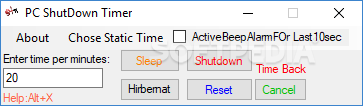
There are situations that compel you to leave your computer running, despite the fact that you need to go to bed or leave the house, such as a long antivirus scan or Windows updates. PC ShutDown Timer is an app that can help shut down the computer, regardless if you’re there or not.
This software comes with a small and simple interface, with an intuitive layout. All tasks can be set from the same window, so users of all levels of experience should be able to find out easily all that the software has to offer.
The program has four available functions. Thus, the app can put the computer in “Sleep” or “Hibernate” mode, restart it or shut down the system entirely.
The software requires you to input a number of minutes before starting the countdown timer. PC ShutDown Timer doesn’t come with a top limit, which means the timer can be set for any number of minutes.
Another option is to select one of the values under the “Static Time” tab, which offers preset time intervals starting at 5 minutes and going up to one week.
PC ShutDown Timer can let you know that the time is running out by activating an alarm. However, this only works in the last ten seconds. If you’ve changed your mind, the task can be canceled very easily, with just a push of a button.
PC ShutDown Timer is a light and useful tool that can be of great help. While the UI might be bland as far as aesthetics are concerned, it’s extremely easy to use. It can save you a considerable amount of time by letting you attend your work, without worrying that your computer stands by for no reason.
What's new in PC ShutDown Timer 1.1:
- This version includes possibility to choose static time and exit item in system tray
PC ShutDown Timer 1.1
add to watchlist add to download basket send us an update REPORT- runs on:
-
Windows 10 32/64 bit
Windows 2008
Windows 2003
Windows 8 32/64 bit
Windows 7 32/64 bit
Windows Vista 32/64 bit
Windows XP 32/64 bit - file size:
- 74 KB
- filename:
- PC ShutDown Timer.exe
- main category:
- System
- developer:
Zoom Client

calibre

Windows Sandbox Launcher

Bitdefender Antivirus Free

Context Menu Manager

ShareX

4k Video Downloader

IrfanView

Microsoft Teams

7-Zip

- IrfanView
- Microsoft Teams
- 7-Zip
- Zoom Client
- calibre
- Windows Sandbox Launcher
- Bitdefender Antivirus Free
- Context Menu Manager
- ShareX
- 4k Video Downloader