
Command-line program that enables you to reboot, shutdown, log off or display a message on a local or remote computer with great ease. #Shutdown system #System shutdowner #Remote shutdown #Shutdown #Shutdowner #Remote

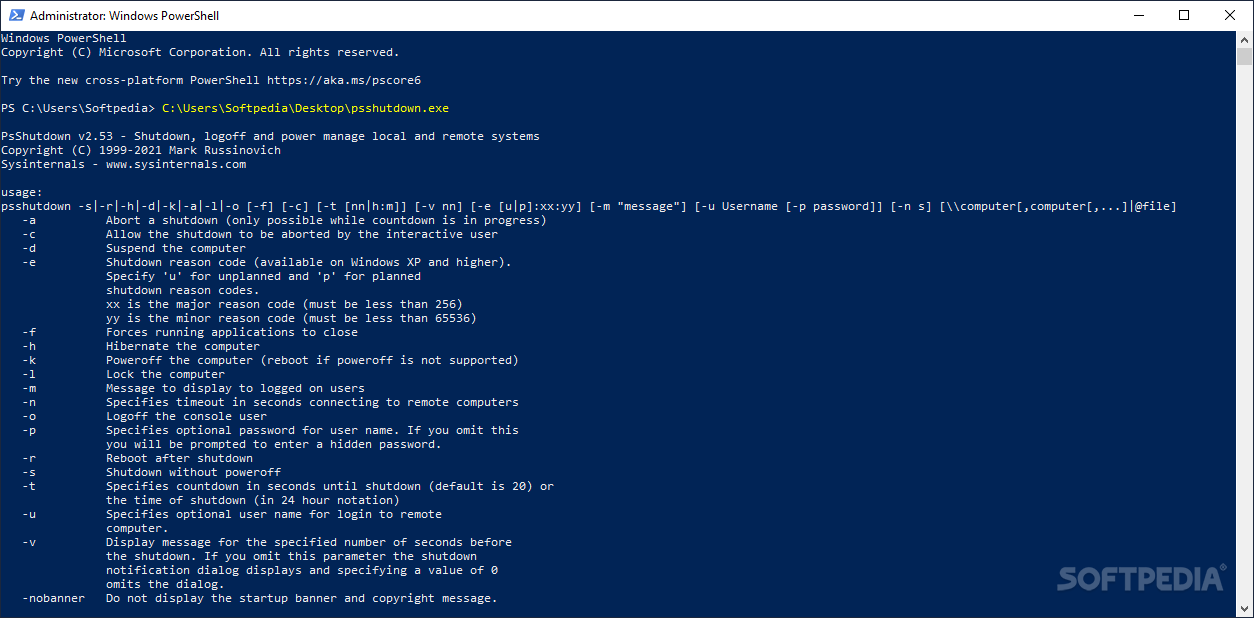
PsShutdown is a command-line software utility that was built specifically to aid people in shutting down or logging off the local or a remote computer.
The setup process is not a prerequisite, as this tool is portable. As a consequence, it is not going to add any new entries to the Windows registry without your approval, and no leftovers will remain on the HDD after its removal.
Another important aspect is that you can easily move the program files to a USB thumb drive and run it from there on any computer you have access to.
As stated previously, this application enables you to shout down or log off a PC by connecting remotely to it. Aside from that, it is also possible to abort a shutdown while the countdown is in progress, suspend the computer and even force running apps to close.
You can hibernate a remote machine, lock it, reboot and create a message to display it on the PC you are connected to, for a specified number of seconds.
It is important to keep in mind that this program is going to display a list of all the actions you can take and the exact form in which to write the commands. Further instructions will be displayed in the main window, and thus all types of users can learn how to handle PsShutdown.
In conclusion, PsShutdown is a pretty simple, yet handy piece of software when it comes to remotely shutting down a computer. It has a quick response time and the computer’s performance is not going to be affected at all as it does not require a large amount of CPU and memory in order to function properly. It can be used by everyone with ease and we did not detect any hangs or crashes in our tests.
What's new in PsShutdown 2.6:
- PsShutdown, a command-line utility for managing local or remote shut down, reboot, logoff, or lock for Windows computers, now displays its notification dialog on the target machine, and has a new flag, -x, for turning the monitor off, required to initiate Modern Standby where applicable.
PsShutdown 2.6
add to watchlist add to download basket send us an update REPORT- PRICE: Free
- runs on:
- Windows All
- file size:
- 842 KB
- filename:
- psshutdown.exe
- main category:
- System
- developer:
- visit homepage
Windows Sandbox Launcher

paint.net

ShareX

Zoom Client

7-Zip

4k Video Downloader

Microsoft Teams

Bitdefender Antivirus Free

IrfanView

calibre

- Bitdefender Antivirus Free
- IrfanView
- calibre
- Windows Sandbox Launcher
- paint.net
- ShareX
- Zoom Client
- 7-Zip
- 4k Video Downloader
- Microsoft Teams