
This application allows you to schedule your shut down with great ease.. #Shutdown computer #Computer shutdown #Manage shutdown #Shutdown #Logoff #Monitor
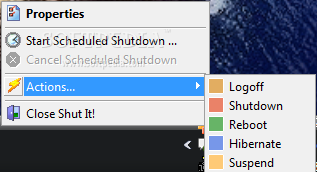
Shut It is a shutdown monitor. In essence it monitors system shutdown requests via the WM_QUERYENDSESSION windows message. When it detects a shutdown, it will temporarily stop the shutdown until user interaction or a timeout period has elapsed. Shut It runs from a small icon in the system tray (beside the clock if visible).
The WM_QUERYENDSESSION does not specify if a shutdown is a shutdown or reboot. There are ways around this but it would appear to require a lot of work for very little result. Instead what I have done is include a Reboot checkbox in the Shutdown Warning dialog which is available when a Shutdown (not a Logoff) is detected. Checking this will turn a Shutdown into a Reboot, failing to check it will turn a Reboot into a Shutdown etc.
Hibernation needs to be enabled in the Windows Control Panel Power Options applet. If Hiberation is not enabled, and is requested, the system will Standby/Suspend instead.
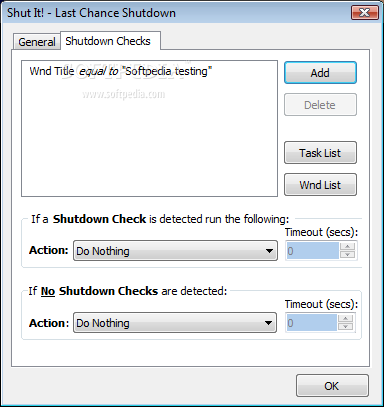
During a Shutdown request, Shut It will scan (most of) the system process names and window titles. If any of these match existing user defined matches the system will perform the Shutdown Check detected Action. Otherwise the system will perform the No Shutdown Checks detected action.
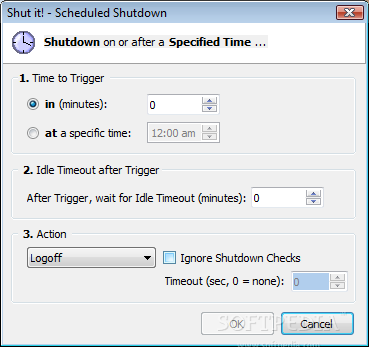
A Scheduled Shutdown allows you to specify a time in minutes or a specified time to attempt a system shutdown (or logoff, hibernate or suspend). Additionally you may specify an idle timeout. If you do, the idle timeout is only checked after the Scheduled Shutdown (timer) has triggered. For instance if you register a Scheduled Shutdown for 30 minutes and an Idle Timeout of 10 minutes, the idle count will only start once the 30 minute timeout has expired. Subsequently the idle timeout will stay active until it executes or is cancelled.
Shut it 1.1
add to watchlist add to download basket send us an update REPORT- runs on:
- Windows All
- file size:
- 912 KB
- filename:
- ShutItInst.exe
- main category:
- System
- developer:
- visit homepage
Microsoft Teams

Windows Sandbox Launcher

4k Video Downloader

calibre

ShareX

Bitdefender Antivirus Free

7-Zip

IrfanView

Zoom Client

paint.net

- IrfanView
- Zoom Client
- paint.net
- Microsoft Teams
- Windows Sandbox Launcher
- 4k Video Downloader
- calibre
- ShareX
- Bitdefender Antivirus Free
- 7-Zip